 Language
 Español
 Português
 Français
 Deutsche
 हिन्दी
 Nederland
 Русский
Geometry Arrow
Rating: 4.08 from 5 (based on 39 votes. 👍 30 – users like it, 👎 9 – disliked, 💬 0 – comments posted)
Released: August 2025
Geometry Arrow – Dash, Dive, and Master the Wave Mode Online on PlayMiniGames
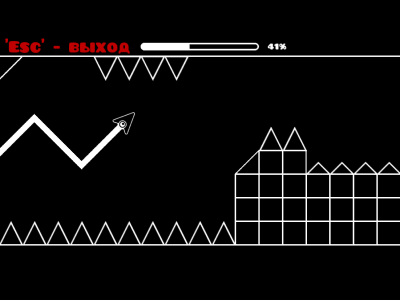
Geometry Arrow is a high-speed platformer inspired by the legendary Geometry Dash, but rebuilt around one thing: the addictive, razor‑sharp Wave mechanic. Guide a sleek arrow through tightly designed obstacle lanes, zig‑zagging up and down with precise clicks while the speed ramps and the track narrows. It’s easy to start, tough to master, and totally free to play in your browser on PlayMiniGames — no downloads. ⚡🎯
What Makes Geometry Arrow Different
Instead of switching between multiple icon forms, Geometry Arrow doubles down on Wave-only gameplay. That focus delivers instant clarity: click to climb, release to drop, thread the gaps, and keep the rhythm. The result is pure flow — quick restarts, crisp inputs, and levels that reward pattern recognition, composure, and split‑second timing.
Geometry Dash Roots, Geometry Arrow Identity
Taking cues from Geometry Dash’s rhythm-based platforming and notorious difficulty spikes, Geometry Arrow turns the Wave mode into a full experience. Expect tight corridors, spike clusters, speed shifts, and visual feints. The emphasis is on readable patterns and fair but fierce challenges that push your precision without cheap tricks.
Core Gameplay – Ride the Wave
Your arrow moves forward automatically. You control altitude with simple click/hold inputs that create a distinctive zig‑zag path. Clip a spike or wall and your run resets instantly — learn the pattern, refine your timing, and try again. As your consistency improves, you’ll flow through sections that once felt impossible. 😎
Controls
- Mouse/Touch: hold to ascend, release to descend
- Click/Release rhythm defines your wave angle and spacing
- Optional keyboard: hold any action key mapped by your device to rise
All Levels & Difficulty Curve
Geometry Arrow features six handcrafted stages that escalate from warm‑up to demon-level chaos. Each track introduces new obstacle rhythms, tighter lanes, and faster sections so you always have something to master next.
- Level 1 – Easy: Tutorial-like pacing. Learn spike spacing, ceiling glides, and basic wave angles.
- Level 2 – Normal: Longer lanes, extended spike runs, and floating hazards that test early consistency.
- Level 3 – Hard: Narrow corridors and faster arrow speed shrink your margin for error.
- Level 4 – Harder: A turning point — rapid speed bursts and compact patterns demand clean rhythm.
- Level 5 – Insane: Shifting obstacles and sudden reveals keep you reacting, not overthinking.
- Level 6 – Demon: Peak speed, disorienting visuals, and unforgiving gaps — a true pro challenge. 🔥
How to Master the Icon
Your icon is a streamlined triangular arrow optimized for wave control. Gravity-like pull and your input cadence create the up/down pattern. You can glide along open ceiling/floor lanes but any obstacle ends the run — accuracy first, swagger second.
Click & Hold Basics
- Tap/Release for short altitude tweaks through tight gaps
- Hold to climb, brief hold to skim ceilings, release to dive
- Keep a steady click rhythm to stabilize your wave angle
Pro Tips for Consistent Clears
- Learn the map: Every level has fixed patterns — memorize anchor points (first spike after a speed pad, last gap before a transition).
- Count the beats: Use internal timing (1‑2‑tap, 1‑tap‑tap) to smooth out panic clicks.
- Small moves win: Micro‑taps correct altitude without over‑swinging into spikes.
- Reset fast: Instant retries build muscle memory — momentum matters more than luck.
- Calm the hands: Relax your grip to avoid over‑holding during speed bursts. 🧠
Features You’ll Love
- Wave‑only design for pure, focused platforming
- Six exclusive stages with escalating difficulty
- Clean visuals plus atmospheric tracks for immersion
- Instant restarts and quick load for “one more try” loops
- Desktop and mobile friendly — tap or click to play anywhere 📱💻
Play Free on PlayMiniGames
Think you can ride the wave? Jump into Geometry Arrow on PlayMiniGames and push your precision to the limit. The rules are simple — the satisfaction of a clean clear is unmatched. Play now and chase that perfect run! 🚀
FAQ
Is Geometry Arrow the same as Geometry Dash?
No. Geometry Arrow is inspired by Geometry Dash but centers the experience entirely on Wave gameplay with its own levels, pacing, and visuals.
How do I control the arrow?
Hold to rise, release to fall. Small, rhythmic inputs let you thread tight spaces without over‑steering.
How hard does it get?
Difficulty ramps across six levels from Easy to Demon. Expect speed spikes, narrow lanes, and pattern mixes that test reflexes.
Does it work on mobile?
Yes. Geometry Arrow runs smoothly in modern mobile and desktop browsers. Tap to control on phones and tablets.
Any tips for beginners?
Start on Level 1, practice short taps, and memorize two or three key markers per section. Build confidence, then move up.