 Language
 Español
 Português
 Français
 Deutsche
 हिन्दी
 Nederland
 Русский
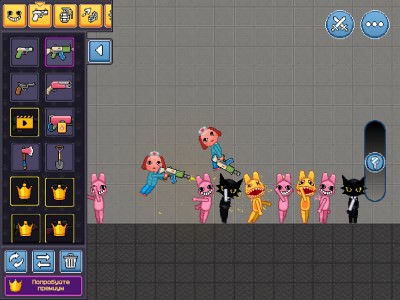
Animal Hospital Playground
Rating: 4.08 from 5 (based on 13 votes. 👍 10 – users like it, 👎 3 – disliked, 💬 0 – comments posted)
Released: August 2026
Animal Hospital Playground: Ragdoll Physics Sandbox is an open-ended physics sandbox where animal patients behave like ragdolls inside a workshop full of machines, switches, conveyor belts, rockets, fireworks, water, lava, weapons, armor, and other interactive objects. There is no score, timer, or required objective. You simply build a contraption, connect its parts, activate it, and watch the physics system determine what happens next 🐾⚙️.
The game focuses on experimentation rather than winning. Players can place objects anywhere on the map, connect machines to levers with wires, create automated sequences, and combine different physics elements into increasingly complicated setups.
Play Animal Hospital Playground online on PlayMiniGames from a desktop, phone, or tablet and create your own strange physics experiments inside the animal hospital workshop.
Play Animal Hospital Playground Online
Animal Hospital Playground gives you a prepared machine workshop and then removes almost every restriction. There is no mission list telling you what to build and no scoring system judging whether your creation is efficient.
Select an item from the menu, place it on the map, and start experimenting. A simple setup might contain one animal, one lever, and one door. A more complicated machine can include conveyor belts, multiple switches, rockets, water, fireworks, and several connected mechanisms.
The main attraction is seeing how all these systems interact through ragdoll physics. Small changes in position, timing, or wiring can produce completely different results.
How to Play Animal Hospital Playground
Choose an object from the available menu and place it in the workshop with a left-click on desktop or a tap on mobile. Objects can then be combined into larger contraptions.
Levers control machines through wires. Connect a lever to one or more devices, then pull it to activate everything linked to that circuit.
You can start with a simple mechanism and gradually expand it:
- Place a ragdoll patient on the map
- Add a lever
- Place a machine such as a door or conveyor belt
- Connect the lever and machine with a wire
- Pull the lever and watch the result
- Add more connected devices
- Experiment with timing and object placement
- Combine rockets, liquids, fireworks, and moving platforms
If your first machine does nothing, simplify it. Test one lever and one device before adding several more components.
Build Machines with Levers and Wires
The wiring system turns Animal Hospital Playground from a basic physics toy into a construction sandbox.
Levers act as control switches. Machines connected to them remain inactive until the lever is pulled. Wires define which devices respond to each switch.
Several machines can be connected to one lever, allowing a single action to trigger an entire sequence. For example, one pull could open a door, start a conveyor belt, and launch a rocket.
This makes it possible to create chain reactions and automated setups without needing complicated programming tools.
Ragdoll Animal Patients
The animal patients use ragdoll physics, meaning their bodies react dynamically to movement, impacts, falling objects, machines, and environmental forces.
Instead of using fixed animations for every situation, the physics engine determines how the character moves after being pushed, dropped, launched, or carried by a conveyor.
This creates unpredictable results. Running the same machine twice may not always produce exactly the same movement, especially when multiple objects collide.
Conveyor Belts, Doors, and Rocket Silos
Conveyor belts allow you to move patients and other objects automatically through your construction. They are useful when creating a sequence where something must travel from one machine to another.
Doors can hold objects back until the correct moment. Connect one to a lever and use it as a gate inside a larger contraption.
Rocket silos provide one of the more dramatic physics tools. Anything positioned on top can be launched when the silo activates. Their direction and placement can completely change the resulting trajectory 🚀.
Combining these systems allows you to create machines where an object is released through a door, carried along a conveyor, and launched at the end of the line.
Fireworks, Water, and Lava
Fireworks add explosive force to the sandbox. When activated, they can knock nearby ragdolls and objects around the scene.
Water behaves as a moving environmental element and can push objects downhill as it spreads through the map.
Lava creates another type of hazard and affects objects or characters that come into contact with it.
Liquids can be especially interesting when combined with slopes, doors, and moving machinery because they introduce another unpredictable force into the experiment.
Weapons and Armor
The sandbox also includes weapons and armor that can be placed on or around the animal patients.
Armor can be used to test how well a ragdoll survives impacts and environmental hazards, while weapons provide additional ways to create physics interactions.
Because there is no formal objective, these items can be used however you want within your experiments.
Explore the Workshop
The map does not begin as an empty field. A machine workshop is already present when you start.
Before building a completely new contraption, explore the existing equipment. Some parts of the workshop are described as puzzle-like setups that may require the correct connection before they work.
Experimenting with these existing machines can also help you understand how wires, switches, and physics objects interact before you create something more complicated.
Create Chain-Reaction Machines
Once you understand the basic tools, try building larger automated sequences.
You might create a conveyor that moves a patient toward a door, connect the door and conveyor to the same lever, place a rocket at the end, and add fireworks nearby.
The important part is testing each section individually. If a complicated contraption fails, disconnect parts until you identify which component is not activating correctly.
Building in stages is usually more reliable than placing ten machines at once and trying to diagnose everything afterward.
Animal Hospital Playground on Mobile
The game supports touch controls in the browser, allowing it to work on compatible phones and tablets.
Tapping the screen places objects in the same way that left-clicking does on desktop. This makes the core building system accessible without a mouse or keyboard.
For more complicated machines, a larger screen may make it easier to position wires and objects precisely, but the basic sandbox interactions remain available on mobile.
Tips for Animal Hospital Playground
- Start with one lever and one machine.
- Test every connection before adding another device.
- Leave enough space between objects so physics interactions remain predictable.
- Use conveyor belts to automate movement between machines.
- Use doors to control when an object enters the next part of a sequence.
- Experiment with rocket angles and launch positions.
- Combine water with slopes to move objects naturally.
- Use armor when testing stronger impacts.
- Explore the existing workshop before building from scratch.
- Rearrange components when a chain reaction does not behave as expected.
Why Players May Enjoy Animal Hospital Playground
Animal Hospital Playground may appeal to players who enjoy ragdoll games, physics sandboxes, machine-building games, chain-reaction experiments, playground simulators, and open-ended browser games.
There is no pressure to earn points or complete a level. The fun comes from inventing an idea, building it, testing it, and then changing the design based on what the physics engine does.
Players searching for Animal Hospital Playground online, ragdoll physics sandbox games, animal ragdoll games, machine-building sandboxes, rocket playground games, or browser physics simulators may enjoy its unrestricted experimental gameplay.
Animal Hospital Playground Features
- Open-ended ragdoll physics sandbox
- No score, timer, or required objective
- Animal ragdoll patients
- Drag-and-place building system
- Levers and wire connections
- Automated chain reactions
- Conveyor belts
- Interactive doors
- Rocket silos
- Fireworks
- Water and lava physics
- Weapons and armor
- Pre-built workshop environment
- Desktop mouse support
- Mobile and tablet touch support
Animal Hospital Playground Controls
Desktop:
- Left Mouse Button — Place the selected object
- Object Menu — Choose machines, characters, and other items
- Wire Tool — Connect a lever to a machine
- Lever — Activate connected devices
Mobile:
- Tap — Place the selected object
- Touchscreen — Select items and interact with the sandbox
- Wire Tool — Connect compatible components
- Tap Lever — Activate the connected machines
FAQ About Animal Hospital Playground
What type of game is Animal Hospital Playground?
Animal Hospital Playground is an open-ended ragdoll physics sandbox where players build machines and experiment with animal patients and interactive objects.
Does Animal Hospital Playground have objectives?
No. There is no score, timer, or required goal. Players are free to build and experiment however they want.
How do levers and wires work?
Connect a lever to a machine using a wire. Pulling the lever activates the connected device or devices.
What objects can you place?
The game includes ragdolls, levers, wires, conveyor belts, doors, rocket silos, fireworks, water, lava, weapons, armor, and other workshop elements.
Can one lever activate several machines?
Yes. Multiple devices can be connected so that one lever triggers a larger chain reaction.
Does the game have rocket launchers?
Yes. Rocket silos can launch objects or ragdoll patients placed on top of them.
Can Animal Hospital Playground be played on mobile?
Yes. The browser version supports tapping and touchscreen interaction on compatible phones and tablets.
What should I do if my machine does not work?
Start with one lever, one wire, and one machine. Once that connection works, add more components one at a time.