 Language
 Español
 Português
 Français
 Deutsche
 हिन्दी
 Nederland
 Русский
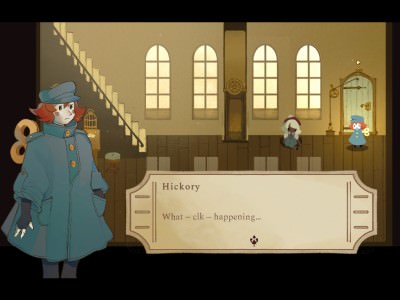
Hickory
Rating: 4.33 from 5 (based on 12 votes. 👍 10 – users like it, 👎 2 – disliked, 💬 0 – comments posted)
Released: August 2026
Hickory is a short simulation game by Daniel Graves where your job is simple in theory: repair the clocktower and get rid of the pests causing trouble inside. The premise combines maintenance, exploration, and an unusual tower setting into a compact indie experience centered on restoring an old structure to working order 🕰️.
The game is available in a WebGL browser version as well as a Windows build. Browser compatibility is limited, however, with the developer specifically stating that Hickory works only in Chrome, Chromium-based browsers, and Firefox.
Play Hickory online on PlayMiniGames and enter the clocktower to discover what needs fixing, deal with the infestation, and complete your unusual repair job.
What Is Hickory?
Hickory is a simulation game built around two objectives: repairing a clocktower and removing the pests that have taken over the area.
The description is deliberately brief, so much of the experience is left for players to discover for themselves. Rather than explaining every task in advance, the game places you inside the environment and lets the situation unfold through exploration and interaction.
The clocktower setting gives the game a distinctive identity. Instead of managing a farm, city, or shop, you are responsible for restoring a large mechanical structure while also solving the problem created by unwanted creatures.
Play Hickory Online
The WebGL version of Hickory can run directly in a supported browser. According to the developer, the browser build currently works only in Chrome, other Chromium-based browsers, and Firefox.
Players using Safari or another unsupported browser may experience loading problems or may be unable to start the game at all.
For the best chance of compatibility, use an up-to-date version of Chrome, Edge, Chromium, or Firefox when launching Hickory in the browser.
How to Play Hickory
The main objective is to repair the clocktower and remove the pests. The supplied description does not provide a full control list, detailed repair system, or step-by-step tutorial, so players should follow the instructions shown inside the game.
Explore the tower carefully and look for anything that appears broken, blocked, damaged, or out of place. Since repairing the clocktower is the central task, mechanical objects and environmental details are likely to be important to your progress.
At the same time, keep track of the pests. Removing them is a separate objective and may require interacting with different parts of the environment.
Because the game is a simulation rather than a pure action title, observation may be just as important as fast reactions. Take time to understand the layout of the tower before moving on.
Repair the Clocktower
The clocktower is the central location and the main focus of the game. Your task is to return it to working condition.
The supplied description does not explain exactly which components need repair or how the maintenance system works, so the game is best approached as an exploration-based simulation where you discover each problem as you progress.
Watch for visual clues, interactive objects, and areas that appear connected to the tower’s machinery. A clocktower is a complex structure, so the repair process may involve several separate tasks rather than one simple action.
Completing the restoration is likely the main measure of progress and the central reason for exploring the environment.
Get Rid of the Pests
Repairing the building is only half of the job. Hickory also asks you to deal with pests that have invaded the clocktower.
The developer does not specify what kind of pests appear or how they are removed, which keeps part of the game’s premise intentionally mysterious.
Players should investigate rooms and hidden areas carefully. If the infestation is spread throughout the tower, some pests may be found away from the obvious repair locations.
This secondary objective gives Hickory more variety than a straightforward maintenance simulator by adding an additional problem that must be solved while restoring the building.
The Clocktower Setting
A clocktower is an unusual setting for a simulation game. It can combine narrow rooms, mechanical spaces, vertical architecture, old machinery, and hidden corners in one location.
This environment supports a more focused experience than a large open-world simulator. Instead of traveling between many unrelated areas, the player can concentrate on understanding one complex structure.
The tower setting also creates a natural reason for exploration. Repair work may require reaching different levels and checking places that are not immediately visible from the starting area.
Browser Compatibility and Known Issues
The developer has listed several known technical limitations that players should know about before starting.
- WebGL browser version — Works only in Chrome, Chromium-based browsers, and Firefox.
- Windows version — The Quit button does not currently work.
- Windows version — Players must use Alt + F4 or Task Manager to close the game.
- Windows version — Displays narrower than 16:9, such as 4:3 monitors, may scale some content incorrectly.
These issues do not necessarily prevent the game from being played, but they can affect convenience and presentation depending on your setup.
Windows Version Notes
The Windows build has a known issue with the Quit button. Selecting it does not properly close the application.
To exit, the developer recommends using Alt + F4 or closing the process through Windows Task Manager.
Players using older or unusually narrow displays should also be aware that interface elements may not fit correctly. The game appears to be designed primarily around a 16:9 aspect ratio.
Tips for Playing Hickory
- Use Chrome, Chromium, Edge, or Firefox for the browser version.
- Inspect the clocktower carefully instead of rushing through the environment.
- Follow in-game prompts because a complete control guide is not provided.
- Keep both objectives in mind: repair the tower and remove the pests.
- Check less obvious areas if you cannot find the next task.
- Use Alt + F4 to close the Windows version if the Quit button does not respond.
- Use a 16:9 display when possible to avoid scaling problems.
Why Players May Enjoy Hickory
Hickory may appeal to players who enjoy short simulation games, repair games, unusual job simulators, environmental exploration, clocktower settings, and compact indie projects.
The premise is easy to understand but distinctive enough to stand out: restore an old clocktower while dealing with a pest problem at the same time.
Players searching for Hickory game, Hickory Daniel Graves, clocktower repair game, pest removal simulator, WebGL simulation games, or short browser indie games may find this project interesting.
Hickory Features
- Clocktower repair simulation
- Pest removal objective
- Compact indie environment
- Exploration-focused gameplay
- WebGL browser version
- Windows version
- Chrome and Chromium browser support
- Firefox support
- Developed by Daniel Graves
FAQ About Hickory
What type of game is Hickory?
Hickory is a simulation game where players repair a clocktower and get rid of pests.
Who developed Hickory?
Hickory was developed by Daniel Graves.
Can Hickory be played in a browser?
Yes. The WebGL version works in Chrome, Chromium-based browsers, and Firefox.
Does Hickory work in Safari?
The supplied description does not list Safari as supported. The developer specifically mentions Chrome, Chromium-based browsers, and Firefox.
What is the main goal?
The main goals are to repair the clocktower and remove the pests.
Does the Windows Quit button work?
No. The developer lists the Quit button as a known bug.
How do you close the Windows version?
Use Alt + F4 or Windows Task Manager.
Does Hickory support 4:3 displays?
The game may run, but the developer warns that content may not scale correctly on displays narrower than 16:9.