 Language
 Español
 Português
 Français
 Deutsche
 हिन्दी
 Nederland
 Русский
Obby: Battle Arena
Rating: 4.33 from 5 (based on 12 votes. 👍 10 – users like it, 👎 2 – disliked, 💬 0 – comments posted)
Released: August 2026
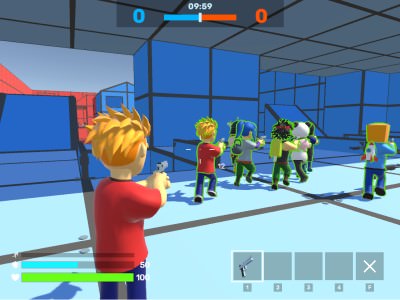
Obby: Battle Arena is a fast-paced third-person shooter where players enter colorful combat maps, choose a game mode, equip powerful weapons, and fight for the highest position on the leaderboard. The game combines Roblox-style characters with arena shooting, character customization, fast movement, and several weapon slots.
Every battle rewards accurate aiming, smart positioning, quick weapon switching, and awareness of the surrounding map. Players can sprint to escape danger, hide their weapon to move faster, aim carefully before firing, and select different skins and accessories for their character 🔫🏆.
Play Obby: Battle Arena online on PlayMiniGames and enter a competitive 3D arena filled with exciting battles, cool guns, and customizable fighters.
Play Obby: Battle Arena Online
Obby: Battle Arena places you directly inside third-person multiplayer-style battles where every player must use movement and weapons effectively.
Before entering combat, you can choose the game mode and map. Different arenas may encourage different strategies. Open locations are suitable for long-range weapons, while narrow spaces make close-range combat more dangerous.
The camera remains behind your character, allowing you to see your appearance, nearby cover, and threats approaching from the sides. This perspective also makes movement and positioning especially important.
How to Play Obby: Battle Arena
Your main objective is to enter the selected arena, defeat opponents, avoid being eliminated, and earn a strong position on the leaderboard.
Choose a Game Mode
Select the type of match you want to play before entering the arena. Each mode may have different objectives, scoring rules, or battle conditions.
Check the match structure before fighting so you understand whether you need to focus on eliminations, team performance, or another objective.
Select a Map
Choose from the available battle maps. Every map can contain different routes, open spaces, hiding positions, and elevated areas.
Learn where players usually appear and where you can move when under attack.
Equip Your Weapons
The game provides several weapon slots. Use the number keys to change between available guns during combat.
A fast weapon switch can be more effective than reloading when an enemy is already close.
Move and Aim
Use the movement keys to travel around the arena. Hold the right mouse button when you need more precise aiming, then fire with the left mouse button.
Watch the Leaderboard
Press Tab to view the leaderboard and compare your current performance with the other players.
Third-Person Shooter Gameplay
The third-person camera gives players a wider view than a traditional first-person shooter.
See Your Character
Your selected skin and accessories remain visible during gameplay, making customization an important part of the experience.
Observe Nearby Threats
The wider camera can help you notice opponents entering from the side or approaching nearby cover.
Use Corners Carefully
Third-person perspective can make corners useful for checking the battlefield before moving into an open area. Avoid standing still for too long, because other players may also be watching the same position.
Weapons and Combat
Obby: Battle Arena includes several weapon slots that allow players to respond to different combat situations.
Switch Weapons with Number Keys
Press 1, 2, 3, or 4 to select another equipped weapon.
Learn which gun is assigned to each slot so you can switch quickly without looking away from the battle.
Aim Before Shooting
Use the right mouse button to aim when precision is more important than immediate movement.
Aiming can help during medium- and long-range fights, especially when the opponent is partly protected by cover.
Fire with the Left Mouse Button
Use the left mouse button to shoot. Control your firing and avoid wasting ammunition when the target is too far away or hidden.
Reload at the Right Time
Press R to reload. Move behind cover before reloading whenever possible, because the weapon may be unavailable for a short moment.
Sprinting and Faster Movement
Movement speed can determine whether you survive a dangerous encounter.
Use Shift to Sprint
Hold Shift to run faster. The weapon is hidden while sprinting, which means you trade immediate shooting ability for extra speed.
Use sprinting to escape exposed areas, reach cover, chase an injured opponent, or return to the center of the fight.
Hide the Weapon with F
Press F to hide the current weapon and increase movement speed.
This is useful when crossing the map, repositioning between battles, or trying to avoid an opponent you are not ready to fight.
Do Not Sprint Directly into Enemies
Because your weapon is hidden while moving quickly, stop sprinting before entering a dangerous corner or open battle area.
Choose Maps Based on Your Playstyle
Different map layouts support different strategies.
Open Areas
Large open spaces favor accurate aiming and careful use of cover. Avoid moving in a straight line when opponents can see you from far away.
Narrow Routes
Corridors and small rooms create fast close-range fights. Keep a suitable weapon ready and listen for nearby action.
Elevated Positions
Higher ground may provide a clearer view of the arena, but it can also expose you to several enemies at once.
Multiple Paths
Maps with several routes allow players to flank opponents and avoid heavily defended locations.
Character Skins and Accessories
Obby: Battle Arena includes customization options for the player character.
Select Different Skins
Skins change the visual appearance of your fighter without changing the main shooting mechanics.
Add Accessories
Additional accessories allow players to create a more personal character design.
Create a Recognizable Fighter
Because the game uses a third-person perspective, your selected appearance remains visible throughout the match.
Best Obby: Battle Arena Tips
Keep Moving
A stationary player is an easy target. Move between shots and avoid remaining in exposed areas.
Use Cover Before Reloading
Do not reload in front of an enemy. Move behind a wall or another obstacle first.
Remember Your Weapon Slots
Practice switching with keys 1 through 4 until you know exactly which weapon appears in each slot.
Aim for Distant Targets
Use the right mouse button when fighting at longer range. Careful aiming is usually more effective than firing randomly.
Hide Your Weapon When Traveling
Press F when moving through a safe part of the map and you need extra speed. Draw the weapon again before reaching combat.
Use Sprint for Repositioning
Sprinting is useful for changing positions quickly, but it should not replace careful movement near opponents.
Check the Leaderboard
Press Tab occasionally to see whether you need more eliminations or whether another player is taking the lead.
Learn One Map at a Time
Memorize common routes, cover positions, and combat areas before changing constantly between maps.
Common Mistakes to Avoid
Reloading After Every Shot
Reload only when necessary and safe. Frequent unnecessary reloads can leave you defenseless.
Running with the Weapon Hidden Near Enemies
Extra speed is useful, but you may lose valuable time before firing. Keep your weapon ready in dangerous areas.
Ignoring the Map
Players who focus only on the crosshair may miss flanking routes and nearby cover.
Using One Weapon for Every Situation
Switch between weapons based on distance, available ammunition, and the current threat.
Standing in the Open
Open areas make you visible from several directions. Move from one protected position to another.
Why Players May Enjoy Obby: Battle Arena
Obby: Battle Arena combines accessible controls with competitive third-person shooting. Players can enter matches quickly, customize their character, test different weapons, and improve their position on the leaderboard.
The game is suitable for players who enjoy Roblox-style shooters, 3D arena games, multiplayer combat, character skins, fast gun battles, and browser shooting games.
Players searching for Obby Battle Arena online, Obby third-person shooter, Roblox battle arena games, 3D gun games, multiplayer arena shooters, or browser FPS alternatives may enjoy its action-focused gameplay.
Obby: Battle Arena Features
- Fast third-person shooter gameplay
- Multiple game modes
- Several battle maps
- Four weapon slots
- Aiming and shooting mechanics
- Sprinting and faster movement
- Weapon hiding for increased speed
- Character skins
- Additional accessories
- Leaderboard competition
- 3D Roblox-style characters
- PC keyboard and mouse controls
Obby: Battle Arena Controls
PC Controls
- W, A, S, D — Move the character
- 1, 2, 3, 4 — Change weapons
- Shift — Sprint while hiding the weapon
- R — Reload the current weapon
- F — Hide the weapon and increase movement speed
- Left Mouse Button — Shoot
- Right Mouse Button — Aim
- Esc — Open the game menu
- Tab — View the leaderboard
FAQ About Obby: Battle Arena
What type of game is Obby: Battle Arena?
Obby: Battle Arena is a third-person shooter where players choose maps and game modes, use several weapons, and compete on a leaderboard.
What is the goal of Obby: Battle Arena?
The goal is to fight other players, perform well in the selected mode, and earn a high position on the leaderboard.
Can you choose different maps?
Yes. Players can select from the available maps before entering battle.
How do you change weapons?
Press the number keys 1, 2, 3, or 4 to switch between equipped weapons.
How do you sprint?
Hold Shift to run faster. The weapon is hidden while sprinting.
What does the F key do?
The F key hides the current weapon and increases the character’s movement speed.
How do you aim and shoot?
Use the right mouse button to aim and the left mouse button to shoot.
Can you customize the character?
Yes. The game includes different skins and additional accessories for the player character.
How do you open the leaderboard?
Press Tab during the game to view the leaderboard.