 Language
 Español
 Português
 Français
 Deutsche
 हिन्दी
 Nederland
 Русский
Steve's World
Rating: 4.53 from 5 (based on 17 votes. 👍 15 – users like it, 👎 2 – disliked, 💬 0 – comments posted)
Released: November 2021
Steve’s World – Jump, Collect, and Conquer Retro Realms 🎮✨
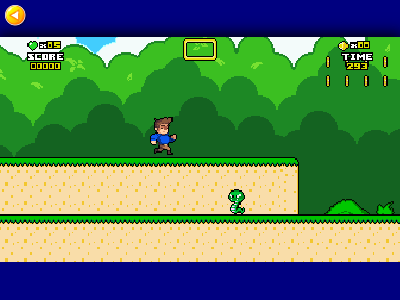
Steve’s World invites you into a vibrant side-scrolling universe where tight jumps, hidden blocks, and cheeky pixel enemies keep adrenaline high and smiles wide. Guide the fearless hero Steve across lush grasslands, spooky caves, and sky-high cloud cities as you hunt for secret coins, dodge roaming critters, and uncover power-ups that turn every level into a treasure hunt. All action runs smoothly in your browser on PlayMiniGames, so there’s nothing between you and a nostalgic platforming rush.
Quick-Start Controls 🚀
-
Arrow keys or W A S D to run left and right, duck, and climb.
-
Z (or K) to leap across gaps and stomp foes.
-
X (or J) to fling fiery projectiles whenever you snag the coveted Fire Flower power-up.
-
Mobile players tap the on-screen buttons for the same silky control scheme.
Power-Ups That Change the Game 🪄
Smash star-marked mystery blocks with Steve’s head and watch goodies burst out:
-
Coin – stack 100 for an extra life and bragging rights.
-
Cape 🦸 – glide to unreachable ledges, grab mid-air bonuses, and skip tricky obstacles.
-
Fireballs 🔥 – toast pesky hedgehogs and swooping bats from a safe distance.
-
1-Up Heart ❤️ – stockpile extra chances for those devilish late-game jumps.
Zones Packed With Retro Charm 🌄
From 8-bit forests echoing chirpy chip-tunes to molten caverns that demand pinpoint double-jumps, each zone adds fresh platforming twists: moving bridges, crumbling stones, clever enemy placements, and hidden warp pipes that whisk you to bonus rooms loaded with gold. Steve’s World keeps exploration rewarding without overwhelming new players.
Why Play on PlayMiniGames? 🏆
-
Instant Launch – HTML5 technology means no downloads, plugins, or waiting. Click Play and you’re sprinting within seconds.
-
Cloud Save – log in to sync your coin count, unlocked zones, and best times across desktop, tablet, and phone.
-
Lag-Free Servers – a global CDN keeps frame rates buttery even on slower networks.
-
Curated Classics – when you clear the final boss, dive into hand-picked platformers like Flip Bottle, Square Bird, and the legendary Crazy Roll 3D right from the same page.
Pro Tips for High-Score Hunters 💡
-
Think Vertical: many coin trails lead upward; use the cape’s lift by briefly holding jump.
-
Chain Stomps: bounce from enemy to enemy without touching the ground to multiply points.
-
Secret Exits: look for slightly off-color bricks—breaking them can reveal warp doors that shortcut entire worlds.
-
Fireball Economy: the flame upgrade stays until you take damage; use it to clear dangerous clusters before they corner you.
-
Patience Pays: each life matters; rushing often means restarting a long level from the beginning.
Cross-Platform Adventure 🌐
Whether you’re sneaking in a round on a work laptop, tapping away on Android during a commute, or relaxing in bed with a tablet, Steve’s World adapts to your screen. Responsive design keeps buttons thumb-friendly, and adjustable quality settings make sure even older devices maintain crisp visuals and smooth animations.
Discover More Pixel-Perfect Platformers 🎲
-
Flip Bottle tests precise flips and landings across interactive furniture landscapes.
-
Square Bird challenges rhythm lovers to build perfect block stacks while dodging ground hazards.
-
Fireboy and Watergirl 1 lets you control two elemental buddies in co-op crystal quests.
-
Crazy Roll 3D delivers endless-runner thrills with mind-bending twists and ramps.
Hop between them effortlessly—the full library lives right here on PlayMiniGames, ready to scratch every arcade itch.
Frequently Asked Questions 🤔
How do I save my progress in Steve’s World?
Create or sign in to a free PlayMiniGames account; your coins, lives, and unlocked levels sync automatically each session.
Can I play Steve’s World offline?
The game is browser-based, so you need an internet connection to load it; afterward, most levels run smoothly even if your signal dips for a moment.
Does Steve’s World support gamepads?
Yes. Connect a standard controller, refresh the page, and the on-screen prompts will switch to button icons for a console-like experience.
Are there hidden levels?
Every world hides at least one warp door accessible by breaking secret blocks or finding alternate exits—explorers reap bonus coins and shortcut routes.
Is Steve’s World suitable for kids?
Absolutely. Its cartoon enemies, bright graphics, and simple controls make it family-friendly, though later stages provide a satisfying challenge for seasoned gamers.