 Language
 Español
 Português
 Français
 Deutsche
 हिन्दी
 Nederland
 Русский
Beat Knight XR
Rating: 4.17 from 5 (based on 24 votes. 👍 18 – users like it, 👎 5 – disliked, 💬 1 – comments posted)
Released: January 2022
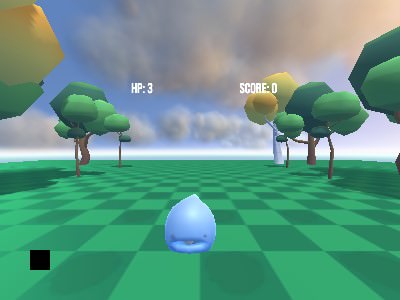
Beat Knight XR is a WebXR action and arcade game from Daydev Company Limited where players enter a low-poly fantasy world, fight slimes and other monsters, improve their equipment, and use two magical swords in virtual reality. The game is designed for modern browsers and can be launched online on compatible WebXR devices ⚔️🟢.
The gameplay is built around simple combat, short action sessions, weapon progression, and repeated monster battles. Instead of complicated menus or long tutorials, Beat Knight XR focuses on direct interaction: enter the fantasy arena, attack enemies, upgrade your weapons, and continue strengthening your knight.
Play Beat Knight XR online on PlayMiniGames with a compatible VR headset and browser, then test how long you can survive while battling slimes with two magic swords.
Play Beat Knight XR Online
Beat Knight XR is a browser-based virtual reality game that uses WebXR technology. This allows the game to run through a supported modern browser without requiring a traditional installation.
To experience the game properly, players need a compatible VR headset and motion controllers. The controllers are used to perform sword attacks and interact with the virtual environment.
The game is designed for quick action and party-style sessions. Its simple rules make it easy to understand: defeat the monsters, improve your weapons, and continue fighting.
What Is Beat Knight XR?
Beat Knight XR is an action-focused VR game where the player becomes a fantasy knight equipped with two magical swords.
Slimes and other monsters appear as enemies, and the player must attack them before they become a threat. The game combines arcade-style combat with a basic progression system based on weapon enhancement.
The supplied description presents it as a “killing time” game, meaning it is intended for short, casual sessions rather than a long story-driven campaign.
The fantasy setting uses low-poly visuals, including environmental assets from the Low Poly Forest Pack by DevilsWork.shop.
How to Play Beat Knight XR
Start the game in a supported WebXR browser and enter VR mode using your headset. Make sure both motion controllers are connected and properly tracked.
Once the game begins, use the two virtual swords to attack incoming slimes and monsters. Swing the controllers as though you are holding real blades.
Continue defeating enemies to progress and improve your weapons. Stronger swords can help you deal with later or more difficult encounters.
The exact controller buttons are not listed in the provided description, so follow the instructions shown inside the game for menu actions and interaction.
Fight Slimes and Monsters
Slimes are among the main enemies in Beat Knight XR. Their simple appearance fits the light fantasy style, but players still need to react quickly and attack at the right moment.
The combat focuses on physical motion. Instead of clicking a mouse button, players swing their VR controllers to perform attacks.
Using two swords allows you to strike from either side and respond to enemies appearing in different positions. Keeping both hands active can make combat faster and more energetic.
The arcade format encourages repeated attempts. Each run gives players another opportunity to improve their reactions, movement, and timing.
Use Two Magic Swords
The two magical swords are the central tools in Beat Knight XR. One sword is controlled by each hand, creating a dual-wielding combat style.
You can alternate attacks, swing both blades quickly, or use each sword against enemies approaching from different directions.
The physical nature of VR combat makes every strike feel more direct than a traditional keyboard or touchscreen attack. Players need enough room to move their arms safely while playing.
Before starting, check the area around you and remove any nearby objects that could be hit accidentally.
Enhance Your Weapons
Weapon improvement is an important part of the progression loop. As you continue playing, you can strengthen the swords and improve your combat ability.
The supplied description does not explain the exact upgrade system, costs, or statistics. However, the main idea is clear: defeat enemies, improve the weapons, and become stronger for future battles.
This creates a simple repeating cycle:
- Enter the game in VR
- Fight slimes and other monsters
- Use both magical swords
- Progress through the current session
- Enhance the weapons
- Return to battle with stronger equipment
WebXR Requirements
Beat Knight XR is an online WebXR game, which means compatibility depends on the browser, headset, controller support, and device performance.
- A WebXR-compatible browser
- A supported VR headset
- Tracked motion controllers
- A device capable of rendering browser-based VR content
- Enough free physical space for safe controller movement
If the game does not enter VR mode, check whether WebXR is enabled and whether the headset is recognized by the browser.
Best Tips for Beat Knight XR
- Keep both controllers inside the headset’s tracking area.
- Use short, controlled sword swings instead of excessively wide movements.
- Watch where each slime appears before attacking.
- Use both swords instead of relying on only one hand.
- Prioritize weapon enhancements when they become available.
- Keep enough physical space around you while playing.
- Follow the in-game prompts because exact controller buttons are not provided.
- Take breaks during longer VR sessions if you feel tired or uncomfortable.
Why Players May Enjoy Beat Knight XR
Beat Knight XR may appeal to players who enjoy WebXR games, virtual reality sword combat, slime battles, casual fantasy games, and short arcade sessions.
The game avoids complicated systems and focuses on direct action. Players can enter the fantasy environment, use two swords, defeat monsters, and improve their equipment without learning a long list of mechanics.
The browser-based format also makes the game easier to access on compatible hardware because it can be launched through a modern browser.
Players searching for Beat Knight XR online, WebXR sword games, VR slime games, browser VR action games, dual-sword VR games, or fantasy arcade games may find this project interesting.
Beat Knight XR Features
- Browser-based WebXR gameplay
- Virtual reality action and arcade combat
- Two magical swords
- Slime and monster battles
- Weapon enhancement system
- Simple gameplay loop
- Short party-style sessions
- Low-poly fantasy environment
- Motion-controller sword attacks
- Playable through compatible modern browsers
- Developed by Daydev Company Limited
Beat Knight XR Controls
The supplied description does not provide a complete controller layout.
- VR Motion Controllers — Control the two magical swords
- Physical Controller Movement — Swing the swords and attack monsters
- In-Game Prompts — Follow displayed instructions for menus and additional actions
FAQ About Beat Knight XR
What type of game is Beat Knight XR?
Beat Knight XR is a browser-based WebXR action and arcade game where players fight slimes and monsters using two magical swords.
Who developed Beat Knight XR?
Beat Knight XR was created by Daydev Company Limited.
Do I need a VR headset?
Yes. A compatible VR headset and motion controllers are required for the intended gameplay experience.
Can Beat Knight XR run in a browser?
Yes. It is designed as an online WebXR game for compatible modern browsers.
What weapons do you use?
The player uses two magical swords controlled with VR motion controllers.
Which enemies appear in the game?
The supplied description specifically mentions slimes and other monsters.
Can weapons be upgraded?
Yes. Weapon enhancement is part of the game’s progression system.
Are the exact controls available?
The complete button layout is not included in the description, so players should follow the instructions displayed inside the game.