 Language
 Español
 Português
 Français
 Deutsche
 हिन्दी
 Nederland
 Русский
tempoVR
Rating: 4.39 from 5 (based on 46 votes. 👍 38 – users like it, 👎 7 – disliked, 💬 1 – comments posted)
Released: January 2022
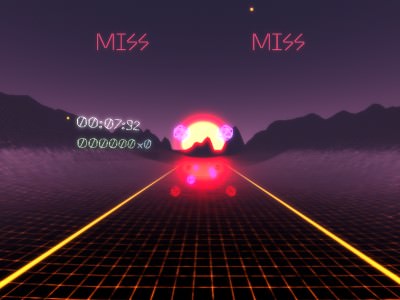
tempoVR is an experimental virtual reality rhythm game where accuracy affects more than your score. Hit notes in time with the music, maintain a combo, avoid bombs and obstacles, and collect enough energy to control the speed of the entire track. By holding a controller trigger or grip, you can accelerate or slow down time and change the way the song plays around you ⏱️🎵.
The game combines familiar block-hitting rhythm mechanics with a time-manipulation system. Playing faster can help you finish before the clock expires and potentially improve your score, but higher speed also makes every note harder to hit. Slowing the track gives you more time to react, yet it consumes energy and may reduce your ability to complete the song efficiently.
tempoVR is a proof-of-concept project and remains incomplete. The downloadable executable is recommended for the best experience, while the WebXR build may have unreliable controller input. A non-VR preview is also available, but it only allows you to walk around and watch the level rather than play it.
Play tempoVR Online in Virtual Reality
tempoVR is designed primarily for VR headsets and motion controllers. Players stand inside a rhythm arena and strike incoming notes in time with the music.
Correct hits award points, increase the combo multiplier, and generate energy. Missing notes reduces points and breaks or weakens the combo. Obstacles and bombs must also be avoided because they can slow the player down and drain energy.
The browser build uses WebXR, but the developer notes that its controller input is problematic. A hotfix using rebound controls allows the build to function, although the controls may feel unintuitive. For a more stable experience, the downloadable executable is recommended.
How to Play tempoVR
Your goal is to complete the song before time runs out while earning the highest score possible. Success depends on balancing speed, accuracy, combo preservation, and energy management.
Strike the incoming notes on the beat to gain points and energy. Avoid bombs instead of hitting them, and physically dodge obstacles that enter your path.
Once enough energy has been collected, hold either the trigger or grip on a controller to modify the tempo. One input speeds up the track, while the other slows it down.
Changing time creates a constant strategic choice. Speeding up can help you race through the song and may increase scoring opportunities, but it also gives you less time to respond. Slowing down can make difficult patterns easier, though the effect consumes the energy needed to control tempo.
Hit Notes and Maintain Your Combo
Accurate rhythm play is the foundation of tempoVR. Every successful note contributes to your score and helps build a combo multiplier.
Long streaks of correct hits are more valuable than occasional accuracy. Once the multiplier increases, each additional note can contribute more points.
Missing a note reduces your score and damages the combo. Because of this, speeding up the music too aggressively may produce worse results even if you finish the track sooner.
The highest scores are likely to come from players who increase the tempo only when they can continue hitting notes reliably.
Collect Energy and Control Time
The time-control mechanic separates tempoVR from a standard VR rhythm game.
Energy is earned by hitting notes successfully. After collecting enough, you can spend it to alter the speed of the music and level.
Speed Up the Track
Increasing the tempo makes notes and obstacles arrive faster. This can help you progress through the song before the clock expires and creates a more intense challenge.
Speeding up works best during patterns you already understand. Using it during an unfamiliar or complicated sequence may quickly destroy your combo.
Slow Down Time
Reducing the tempo gives you more time to read note patterns and respond to hazards. It can be useful during difficult sections or when the current speed becomes overwhelming.
Slowing time still requires energy, so it cannot be used without limits. You must continue hitting notes to replenish the resource.
Avoid Obstacles and Bombs
Not every incoming object should be hit. Bombs punish careless swings, while physical obstacles must be dodged.
Colliding with an obstacle slows you down and removes energy. This can prevent you from using time control at the moment it is needed most.
Good performance therefore requires both accurate arm movement and awareness of the full environment. Focusing only on the notes may cause you to miss a wall or bomb approaching from another direction.
Race Against the Clock
tempoVR is built around time pressure. Completing the song is not only a matter of surviving every note pattern. You must also manage the overall tempo well enough to reach the end before the clock runs out.
Playing too slowly may improve accuracy but leave insufficient time to finish. Playing too quickly may save time while causing missed notes, lost energy, and a broken multiplier.
The central challenge is finding a personal balance between speed and control. Skilled players may use faster tempo for simple sections and slow down only for difficult patterns.
Beat Saber Map Support
tempoVR supports levels created in the Beat Saber map format. Compatible maps can be found on community sites such as BeatSaver and BeastSaber.
However, the current jam version does not include a level browser or loader. It starts with one pre-made level because the developers did not have enough time to complete the originally planned loading system.
Support for loading additional maps may be added in a later version, but the developer has not confirmed when or whether that feature will be completed.
WebXR Version Limitations
The WebXR build allows the project to run through a compatible browser and VR headset, but it is described as particularly unstable.
The most significant problem is controller input. The developers applied a hotfix using rebound controls, which makes the game usable but may not feel natural.
tempoVR is also described as buggy, incomplete, and not fully tuned. Players should expect proof-of-concept quality rather than a finished commercial rhythm game.
The downloadable executable is recommended because it is likely to provide more reliable performance and input than the browser build.
Non-VR Preview Mode
Players without a VR headset can open a non-WebXR version and explore the environment using a basic first-person controller.
This mode is not a playable adaptation of tempoVR. You cannot properly hit notes, control the tempo, or experience the intended motion-controller gameplay.
The non-VR build only allows visitors to move around the scene and watch the rhythm level being played. The developer describes this implementation as rough, so movement and presentation may not work perfectly.
Development and Credits
tempoVR was created as a small experimental project focused on rhythm mechanics and time manipulation.
- Programming and design — @grave-bud and @guysoft
- Art — @grave-bud
- Music and sound effects — @sonofluiz
- Anthony Font — Sun Young Oh
- Additional texture resources — Kenney Particle Pack
The developers have invited players to share feedback and indicate whether they would like to see the project continue.
Best tempoVR Tips
- Focus on accuracy before increasing the track speed.
- Build energy during easier note patterns.
- Save some energy for difficult or obstacle-heavy sections.
- Slow the tempo when maintaining a combo is more valuable than rushing.
- Speed up only when you can still read the incoming notes.
- Watch for bombs and obstacles instead of staring only at the next note.
- Use the downloadable build when WebXR controller input becomes unreliable.
- Treat the non-VR mode as a scene preview, not as a complete game.
Why Players May Enjoy tempoVR
tempoVR may appeal to players who enjoy virtual reality rhythm games, Beat Saber-style custom maps, experimental mechanics, score chasing, and time-control gameplay.
The ability to change tempo adds a strategic layer that is uncommon in traditional rhythm games. Players are not simply following the song—they are actively deciding how quickly the song should move.
Players searching for tempoVR online, WebXR rhythm games, VR time-control games, Beat Saber map games, browser VR music games, or experimental VR projects may find this proof of concept interesting.
tempoVR Features
- Virtual reality rhythm gameplay
- Note hitting based on musical timing
- Combo multiplier and score system
- Energy earned through accurate hits
- Ability to speed up or slow down time
- Bombs and physical obstacles
- Energy loss after collisions
- Race-against-the-clock structure
- Support for Beat Saber map format
- Pre-made jam level
- Experimental WebXR version
- Non-VR environment preview
- Downloadable executable recommended
FAQ About tempoVR
What type of game is tempoVR?
tempoVR is a proof-of-concept virtual reality rhythm game where players hit notes, avoid hazards, collect energy, and change the speed of time.
Can tempoVR be played without VR?
No. The non-VR version only lets players walk around and watch the scene. It does not include the full playable rhythm mechanics.
How do you change the tempo?
After collecting enough energy, hold either the trigger or grip on a VR controller to speed up or slow down the track.
What happens when you miss notes?
Missing notes costs points and reduces the combo multiplier.
What do obstacles do?
Obstacles slow the player down and drain energy. Bombs must also be avoided.
Does tempoVR support custom maps?
The game supports the Beat Saber level format, but the jam version does not yet include a level loader and only starts with a pre-made map.
Does the WebXR version work properly?
The WebXR build works with a controller-input hotfix, but the developers warn that its controls are problematic and may feel unintuitive.
Which version provides the best experience?
The developers recommend downloading the executable file for the most reliable gameplay.