 Language
 Español
 Português
 Français
 Deutsche
 हिन्दी
 Nederland
 Русский
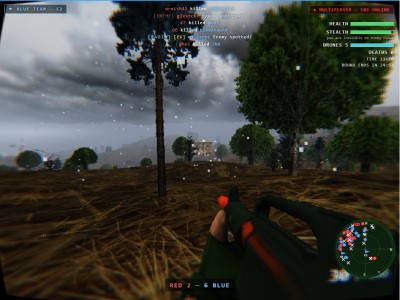
DroneSim
Rating: 4.33 from 5 (based on 12 votes. 👍 10 – users like it, 👎 2 – disliked, 💬 0 – comments posted)
Released: October 2026
DroneSim is a free online FPV drone simulator and multiplayer combat game where you control military drones, operate soldiers on the ground, and participate in tactical battles. Experience modern drone warfare from two different perspectives: navigate dangerous environments as an infantry soldier or take control of an FPV drone to locate and attack enemy targets from the air. 🚁
Unlike traditional military shooters, DroneSim combines first-person infantry combat with drone piloting in one browser game. Switch between your soldier and drone, use thermal and night vision to identify enemies, and adapt your strategy to changing battlefield conditions.
Play DroneSim online for free on PlayMiniGames. No download, installation, or account registration is required to start playing.
What Is DroneSim?
DroneSim is a browser-based multiplayer military action simulator focused on FPV drone operations and tactical ground combat. Players navigate battlefield environments, control unmanned aerial vehicles, and use different movement and observation systems to complete objectives.
The game combines two important aspects of modern combat: the mobility of infantry soldiers and the aerial perspective provided by drones.
Rather than limiting you to one type of gameplay, DroneSim allows you to switch between ground operations and aerial drone control. This creates a more flexible tactical experience where positioning and situational awareness matter.
Fly FPV Drones in Tactical Combat
FPV stands for First-Person View, a system that allows pilots to experience flight through the camera mounted on a drone.
In DroneSim, you can control an FPV drone and navigate through combat environments while searching for targets.
Drone flight involves managing several important movements:
- Pitch – Adjust the drone's forward and backward orientation.
- Yaw – Rotate the drone to change its direction.
- Altitude – Control how high or low the drone flies.
Learning to coordinate these movements helps you maneuver more effectively and approach targets from different directions.
Flying accurately requires concentration, especially when navigating close to structures or positioning your drone for an attack.
Switch Between Soldier and Drone
One of DroneSim's most distinctive features is the ability to switch between infantry gameplay and drone piloting during the same session.
When controlling a soldier, you can move across the battlefield, change positions, and use the environment to approach objectives.
When operating a drone, you gain an aerial perspective that can help you observe the battlefield and identify threats from above.
This creates interesting tactical possibilities. You can approach an area on foot, switch to your drone to assess the situation, and return to your soldier when ground movement becomes necessary.
The combination of aerial observation and infantry control distinguishes DroneSim from conventional first-person shooting games.
Infantry Combat and Movement
DroneSim includes ground-based soldier controls that allow players to navigate military environments.
Available movement actions include running, crouching, and climbing.
These mechanics help you change positions and adapt to different battlefield situations.
Running allows faster movement between locations, while crouching can help you maintain a lower profile. Climbing provides additional ways to navigate obstacles and terrain.
Effective ground movement becomes particularly important when you need to reposition before launching or controlling a drone.
Thermal Vision and Night Vision
DroneSim includes different vision modes designed to improve battlefield observation.
Thermal vision can help distinguish targets through differences in heat signatures, while night vision is intended to improve visibility in dark environments.
These viewing systems add a tactical element to gameplay by offering alternatives to ordinary visual observation.
Learning when to use each mode can help you locate enemies and better understand your surroundings.
Online Multiplayer Battles
DroneSim supports online multiplayer, allowing players to participate in combat sessions with other people.
Rather than being limited to a single-player flight simulator, the game introduces the unpredictability of human opponents.
Other players may move, change their positions, or approach objectives in unexpected ways, making battlefield awareness particularly important.
The fast-paced format also makes DroneSim suitable for relatively short gaming sessions.
How to Play DroneSim Online
Getting started with DroneSim is straightforward:
- Open DroneSim on PlayMiniGames.
- Start the browser game without downloading additional software.
- Enter an available multiplayer session.
- Control your soldier and navigate the battlefield.
- Switch to FPV drone control when needed.
- Adjust drone pitch, yaw, and altitude to maneuver through the environment.
- Use thermal or night vision to improve observation.
- Identify targets, engage in combat, and complete available objectives.
The supplied description identifies the available movement and flight mechanics but does not provide the exact keyboard shortcuts. Refer to the game's control instructions for the current input layout.
Tips for Better FPV Drone Flying
- Practice smooth flight movements before attempting difficult maneuvers.
- Avoid making unnecessary steering corrections when approaching a target.
- Pay attention to altitude when navigating around obstacles.
- Use the aerial perspective to examine the battlefield before committing to an approach.
- Experiment with available vision modes in different lighting conditions.
- Remember that drone piloting and infantry movement require different tactics.
- Use crouching, running, and climbing to improve your ground positioning.
- Switch between soldier and drone when the situation calls for a different perspective.
Built with Three.js and AI-Assisted Development
DroneSim was developed using Three.js, a JavaScript 3D graphics library that supports interactive experiences inside modern web browsers.
The creator also used AI-assisted development tools, including Cursor and Bolt, during production.
This development approach is sometimes called vibe coding, where AI tools assist with writing and developing software.
The result is a browser-based 3D combat experience that brings drone flight and infantry gameplay together without requiring a traditional desktop installation.
Why Play DroneSim?
DroneSim offers an unusual combination of FPV flight simulation, military action, and multiplayer gameplay.
Instead of choosing between a drone simulator and a tactical shooter, players can experience elements of both in a single game.
The ability to change perspectives, control drone movement, navigate as a soldier, and use advanced observation modes gives the gameplay variety beyond ordinary shooting mechanics.
If you enjoy FPV drone games, military drone simulators, online war games, first-person combat games, tactical shooters, or 3D multiplayer browser games, DroneSim offers an accessible way to experience drone-focused action.
DroneSim Game Features
- Free online FPV drone simulator
- Multiplayer tactical combat
- 3D military environments
- Controllable FPV drones
- Infantry soldier gameplay
- Switch between soldier and drone
- Pitch, yaw, and altitude flight controls
- Running, crouching, and climbing
- Thermal vision mode
- Night vision mode
- Aerial target observation and combat
- Fast-paced multiplayer sessions
- Developed using Three.js
- Built with assistance from Cursor and Bolt AI tools
- No download or installation required
- No account registration required
- Play directly in your browser on PlayMiniGames
Frequently Asked Questions About DroneSim
What is DroneSim?
DroneSim is a free online multiplayer combat simulator where players control FPV drones and infantry soldiers in 3D battlefield environments.
Can I play DroneSim online for free?
Yes. DroneSim is free to play directly in your web browser on PlayMiniGames without downloading or installing software.
Is DroneSim multiplayer?
Yes. DroneSim supports online multiplayer sessions where players can participate in tactical combat with others.
Can you control both soldiers and drones in DroneSim?
Yes. Players can switch between controlling an infantry soldier and piloting an FPV drone during gameplay.
Does DroneSim have thermal and night vision?
Yes. DroneSim includes thermal and night vision modes to help players observe their surroundings and locate enemies.
How do you control an FPV drone in DroneSim?
Players manage flight movements such as pitch, yaw, and altitude. Exact keyboard controls are available through the game's instructions.
Do I need an account to play DroneSim?
No. DroneSim can be started in a browser without account registration.
Was DroneSim made using AI?
Yes. The game was built using Three.js with development assistance from AI tools including Cursor and Bolt.