 Language
 Español
 Português
 Français
 Deutsche
 हिन्दी
 Nederland
 Русский
Mine 3D
Rating: 4.33 from 5 (based on 12 votes. 👍 10 – users like it, 👎 2 – disliked, 💬 0 – comments posted)
Released: November 2019
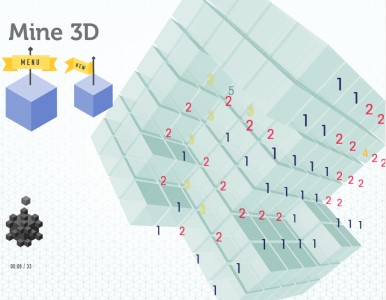
Minesweeper 3D – Same Rules, One More Dimension 🎲
Yes, you can play Minesweeper in 3D. The logic you love now wraps around a cube (or layered grids), turning every deduction into a multi‑axis challenge. Reveal safe cells, use numbers to infer where mines are hiding, and clear the board without a single misclick. Prefer a twist? Try the new “Delete Mines” mode where you surgically remove mines instead of flagging them — shrinking the danger zone one mine at a time.
Game Modes
Classic 3D Minesweeper
- Uncover cells across X, Y, and Z layers.
- Numbers show how many mines touch a cell in all three dimensions.
- Clear every safe cell to win.
Delete Mines Mode
- Instead of marking mines, delete them directly.
- Each correct delete reduces the total mine count.
- Delete a safe cell by mistake and you pay the price — so deduce carefully.
How to Play
- Reveal a cell to get a number hint (0–8+ in 3D, depending on adjacency).
- Use cross‑layer reasoning: neighbors can be above, below, and diagonally in depth.
- Chain clears: empty cells auto‑reveal connected safe regions.
- Finish by clearing all safe cells (Classic) or removing all mines (Delete Mines).
Controls
Desktop
- Left Click: reveal cell
- Right Click: flag mine (Classic) / arm delete (Delete Mines)
- Middle Click or Chord (on numbered cell): quick‑clear if flags match count
- Scroll / Q E: switch depth layers
- Drag with mouse: rotate 3D view (if cube), WASD / Arrow Keys: pan
Mobile
- Tap: reveal
- Long‑press: flag (Classic) or delete (Delete Mines)
- Pinch / swipe: zoom and rotate layers
- Layer switcher: on‑screen buttons to move depth
Tips for 3D Logic
- Start on edges and corners — fewer neighbors means faster certainties.
- Think in stacks: a 1 on layer Z often pairs with exposed candidates on Z±1.
- Use parity patterns: parallel lines of numbers often mirror mine placements across layers.
- In Delete Mines mode, remove only when 100% certain; one wrong delete can cascade.
Why You’ll Love It
- True Minesweeper logic extended into three dimensions
- Two ways to win: classic clearance or mine deletion
- Keyboard, mouse, and touch friendly
- Quick sessions with deep puzzle depth
FAQ
Is 3D Minesweeper harder than classic?
It’s more complex because each cell has neighbors in depth as well as around it. Once you adapt, the same deduction strategies apply.
How does Delete Mines mode work?
You remove mines instead of flagging them. Correct deletes reduce the remaining mine count; incorrect deletes penalize you.
Can I still flag mines in 3D?
Yes in Classic mode. Flags help you chord‑clear numbered cells safely.
Does the game support mobile?
Yes. Tap, long‑press, and on‑screen layer controls provide a smooth touch experience.
Any beginner strategy?
Work layer by layer, mark certainties first, and use chording only when flags match the number. In Delete Mines, act only on proven deductions.