 Language
 Español
 Português
 Français
 Deutsche
 हिन्दी
 Nederland
 Русский

One Shot: World Machine Edition
Rating: 4.33 from 5 (based on 12 votes. 👍 10 – users like it, 👎 2 – disliked, 💬 0 – comments posted)
Released: November 2026
OneShot: World Machine Edition is a story-driven puzzle adventure game where you guide a mysterious child named Niko through a dying world in search of a way to restore its light. Explore atmospheric locations, solve unusual puzzles, meet memorable characters, and uncover the secrets of a strange computer simulation. With its emotional storytelling, pixel art visuals, and creative fourth-wall-breaking mechanics, OneShot offers an adventure unlike traditional RPGs. 💡
Developed by Future Cat Games, OneShot: World Machine Edition is an enhanced version of the original OneShot adventure. It introduces a simulated desktop environment, additional collectibles, new dialogue, and several improvements to the original experience.
Play OneShot: World Machine Edition online in your browser on PlayMiniGames and discover the mysterious journey of Niko. The available browser version may differ from the original PC and console releases.
What Is OneShot: World Machine Edition?
OneShot: World Machine Edition is a single-player puzzle adventure that combines exploration, environmental storytelling, and fourth-wall-breaking puzzles.
You guide Niko, a child who awakens in an unfamiliar world where the sun has disappeared. Carrying a mysterious light bulb believed to be the world's new sun, Niko must travel through dangerous environments and discover how to restore hope to the inhabitants.
However, you are not simply controlling another video game character. OneShot acknowledges the player's existence, creating an unusual relationship between you, Niko, and the world you explore.
Explore a Mysterious World with Niko
The adventure takes you through several distinctive regions, each featuring unique environments, characters, and puzzles.
- The Barrens – A desolate region filled with abandoned machinery and mysterious structures.
- The Glen – A colorful natural environment inhabited by unusual characters.
- The Refuge – An urban area where the world's remaining inhabitants struggle with their uncertain future.
- The Tower – A mysterious destination connected to Niko's mission.
As you explore these locations, you will encounter characters who share information, provide assistance, and reveal more about the world's unusual history.
Discover the Virtual Desktop System
The defining feature of World Machine Edition is its simulated computer desktop.
In the original OneShot, certain puzzles interacted with the player's actual computer environment. World Machine Edition recreates these interactions inside a virtual operating system.
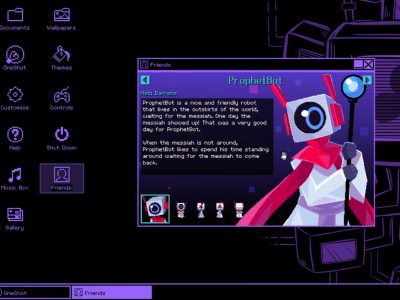
The simulated desktop contains windows, folders, documents, applications, and other interactive elements. Some puzzles require you to investigate files or switch between the game and desktop applications.
This approach preserves the original adventure's unusual puzzle mechanics while keeping the interactions inside the game.
Solve Puzzles Beyond the Game World
OneShot puzzles often require more than simply finding a key or opening a locked door.
You may need to examine documents, interpret clues, combine inventory items, or interact with applications inside the World Machine.
Pay attention to conversations and environmental details. Information discovered in one location may help solve a puzzle somewhere else.
Rather than focusing on combat, OneShot rewards observation, curiosity, and logical thinking.
New Features in World Machine Edition
Compared with the earlier OneShot release, World Machine Edition introduces several additions:
- Virtual Desktop – Interact with a simulated operating system containing files and applications.
- Collectible Wallpapers – Unlock backgrounds for your virtual desktop.
- Desktop Themes – Customize the appearance of the simulated interface.
- Friend Profiles – Collect information about characters you meet.
- Music Box – Replay music discovered during your adventure.
- Gallery – Revisit illustrations and selected story images.
- Badges – Earn achievements throughout your journey.
- Improved Fast Travel – Navigate between discovered destinations using a graphical interface.
- Additional Dialogue – Discover new conversations while experiencing the original storyline.
The original World Machine Edition also supports analog movement with compatible controllers. Availability of these features depends on the browser implementation.
How to Play OneShot: World Machine Edition
- Launch OneShot: World Machine Edition on PlayMiniGames.
- Begin Niko's adventure and explore the starting environment.
- Talk to characters and investigate objects for clues.
- Collect useful items and solve environmental puzzles.
- Explore the simulated desktop when puzzles require additional information.
- Travel between regions and discover the world's secrets.
- Help Niko make important decisions as the story progresses.
Game Controls
The original World Machine Edition uses the following default keyboard controls:
- Arrow Keys – Move Niko.
- Z – Interact or confirm.
- X – Cancel or go back.
- A – Open the main menu.
- S – Open the inventory.
- Shift – Change movement speed.
- F – Toggle fullscreen.
- C – Skip dialogue when the option is enabled.
Check the browser version's instructions for its supported controls and desktop interactions.
Tips for Your First OneShot Adventure
- Read character dialogue carefully because important clues are often hidden in conversations.
- Examine documents and applications on the virtual desktop.
- Remember previously visited locations when searching for puzzle solutions.
- Check your inventory when an object seems connected to a particular puzzle.
- Explore optional areas to discover additional collectibles.
- Avoid spoilers if you want to experience the story's surprises naturally.
OneShot vs. OneShot: World Machine Edition
The original OneShot became known for its emotional storytelling and puzzles that interacted with the player's computer.
World Machine Edition preserves the central story while moving those computer interactions into a self-contained virtual desktop. It also introduces collectible themes, wallpapers, character profiles, additional dialogue, and interface improvements.
Originally released for Nintendo Switch, PlayStation 4, and Xbox consoles on September 22, 2022, World Machine Edition later arrived on Windows through Steam on September 30, 2024, followed by macOS on April 24, 2025.
Why Play OneShot: World Machine Edition?
OneShot stands out through its combination of atmospheric pixel art, unusual puzzles, memorable characters, and a story that directly involves the player.
If you enjoy narrative puzzle games, indie RPG adventures, fourth-wall-breaking mysteries, or emotional experiences similar to Undertale, OneShot: World Machine Edition offers a distinctive journey.
Play OneShot: World Machine Edition on PlayMiniGames, guide Niko through a fading world, and discover why your decisions matter. 🌟
Frequently Asked Questions About OneShot: World Machine Edition
What is OneShot: World Machine Edition?
OneShot: World Machine Edition is a single-player puzzle adventure developed by Future Cat Games. It follows Niko on a journey to restore light to a dying world and features puzzles involving a simulated computer desktop.
Can you play OneShot: World Machine Edition online?
PlayMiniGames provides a browser experience associated with OneShot: World Machine Edition. Its features may differ from the original PC and console releases.
Who is Niko in OneShot?
Niko is the main character of OneShot, a child who must carry a mysterious light bulb believed to be the sun of a dying world.
What is different about World Machine Edition?
World Machine Edition introduces a simulated desktop, collectible wallpapers, themes, character profiles, a music player, a gallery, new dialogue, and improved navigation features.
Is OneShot: World Machine Edition a horror game?
OneShot is primarily a story-driven puzzle adventure with mysterious and sometimes unsettling elements. Its main focus is exploration, emotional storytelling, and solving puzzles rather than combat or conventional horror.
Does OneShot: World Machine Edition have multiple endings?
The original game features important story decisions and additional narrative content that can affect how the adventure concludes. World Machine Edition preserves the original storyline.
Is OneShot: World Machine Edition the same as the original OneShot?
Both versions share the same central story, but World Machine Edition includes a self-contained virtual desktop, new collectibles, additional dialogue, and quality-of-life improvements.