 Language
 Español
 Português
 Français
 Deutsche
 हिन्दी
 Nederland
 Русский
Rocket League
Rating: 4.58 from 5 (based on 19 votes. 👍 17 – users like it, 👎 2 – disliked, 💬 0 – comments posted)
Released: September 2026
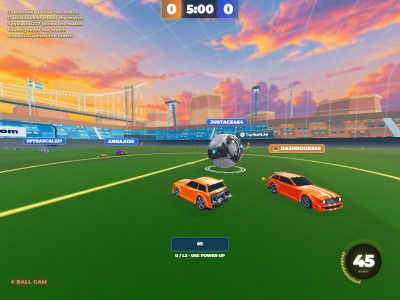
Rocket League is a fast 3D car soccer game where powerful vehicles replace traditional football players. Drive across a large arena, chase a giant ball, use boost to gain speed, and try to send the ball into your opponent’s goal before the other team can stop you. 🚗⚽
The version described here combines arcade racing, soccer, vehicle customization, training modes, tournaments, private matches, and several competitive formats. You can play anything from a 1v1 duel to a chaotic 4v4 match, practice specific skills, customize the appearance of your vehicle, and experiment with different boost effects, wheels, decals, and goal explosions.
Play Rocket League online on PlayMiniGames and test your driving, positioning, timing, aerial control, and shooting skills in high-speed car soccer matches.
What Is Rocket League?
Rocket League is a car soccer game where players use vehicles to move a giant ball around an arena and score goals.
Instead of controlling a football player, you drive a car that can accelerate, reverse, jump, dodge, powerslide, and use boost.
The core objective is simple: score more goals than your opponents.
Actually doing that consistently requires much more than simply driving straight toward the ball. Good players learn how to approach the ball from the correct angle, maintain speed, use boost efficiently, recover after jumps, and position themselves so they can attack without leaving their own goal completely exposed.
How Do You Score Goals?
To score, you need to move the giant ball toward the opposing goal and hit it across the goal line.
The easiest approach is to drive behind the ball so that your car is facing the opponent’s side of the arena.
Once you are close enough, accelerate into the ball and try to direct it toward the goal.
The angle of your car matters. Hitting the center of the ball tends to send it more directly forward, while hitting it from the side can redirect it across the field.
As you improve, you can use jumps, flips, boost, and aerial movement to hit the ball harder or reach it before another player.
Use Boost to Reach the Ball Faster
Boost is one of the most important mechanics in the supplied version of Rocket League.
Boost pickups are placed around the field. Collecting them allows you to activate your vehicle’s nitro-like acceleration and move much faster.
Extra speed can help you:
- Reach a loose ball before an opponent
- Return to your own goal quickly
- Hit the ball with more force
- Recover after losing possession
- Build enough speed for aggressive attacks
- Challenge airborne balls more effectively
Using all of your boost immediately is not always the best option. Keeping some available for defense or a sudden counterattack can be more useful than spending everything during one rush.
Casual Mode
Casual mode allows you to start straightforward car soccer matches without the additional structure of a tournament.
The supplied description lists several team sizes:
- 1v1
- 2v2
- 3v3
- 4v4
Each format changes the way the field feels.
In 1v1, every mistake can immediately become a scoring opportunity for the opponent. In larger matches, positioning and teamwork become increasingly important because several cars may challenge the ball at the same time.
Competitive Mode
Competitive mode is listed as another available option.
The supplied description does not provide the exact ranking, matchmaking, or progression rules, so those details should be checked inside the current game build.
Players who prefer more serious matches can use this mode instead of Casual once they feel comfortable with movement, shooting, and defense.
Tournament Mode
Tournaments allow you to take part in a larger sequence of car soccer matches.
According to the supplied description, you can configure several settings before the tournament starts, including the number of players, bot difficulty, and arena.
This makes Tournament mode useful for players who want more structure than a single standalone match.
Winning consistently requires not only scoring but also adapting to different opponents and match situations.
Training Mode
Training is one of the best places to improve before entering harder matches.
The supplied version lists several training options:
- Free Play
- Custom Training
- Tutorial
- Aerial
- Striker
- Goalie
Free Play is useful for getting comfortable with general movement, while Striker and Goalie training can help with attacking and defending.
Aerial training is particularly useful because controlling the car while airborne requires different inputs from ordinary ground driving.
Private Match
Private Match lets you organize a match with another player or friend according to the supplied description.
This can be useful when you want to practice without joining a public lobby or when you want to compete directly against someone you know.
Customize Your Car
The garage provides extensive vehicle customization.
Customization does not only change the general look of the vehicle. The supplied description includes several separate categories covering body style, decals, colors, wheels, boost effects, goal explosions, and engine sounds.
This gives players a way to make their car visually distinct even when several players are using similar vehicles.
Car Bodies
The supplied version lists the following body options:
- Fennec
- Corsair
- Viper
- Mammoth
- Tempest
Changing the body gives your vehicle a different appearance and lets you build a style that fits your preferences.
Decals and Colors
More than 20 decal designs are mentioned in the supplied description.
You can combine them with standard or customized car colors to create a more personalized appearance.
Changing decals is an easy way to make the same body look significantly different.
Wheels
The supplied description states that 18 wheel and rim models are available.
You can change characteristics such as style, color, and size depending on the available customization options.
Wheels are especially noticeable during replays, jumps, and close-up views of the vehicle.
Boost Effects
Boost can also be visually customized.
The supplied version lists 21 boost styles.
These effects change how the trail behind your vehicle looks when you accelerate using boost.
Because boost is used frequently during matches, this customization can be one of the most visible parts of your car.
Goal Explosions
Scoring can trigger a custom goal explosion.
The supplied description lists 13 different goal explosion effects.
These effects change the visual celebration that occurs after the ball enters the goal.
They do not change the basic scoring objective, but they add personality to successful attacks.
Engine Audio
You can also change the sound of your vehicle’s engine.
The supplied description lists three engine audio options:
- Muscle Car
- Dominus
- Motormouth
This adds another layer of customization for players who want their vehicle to sound as distinctive as it looks.
How to Play Rocket League
The supplied browser-style control scheme is:
- W — Throttle forward and nose down while airborne
- S — Reverse and nose up while airborne
- A — Steer left
- D — Steer right
- Left Mouse, K, or ; — Boost
- Right Mouse, L, or . — Jump, flip, and dodge
- Left Shift or Right Shift — Powerslide
The same movement keys also affect your car while it is airborne, which becomes important when practicing aerial shots and recoveries.
Jumping, Flipping, and Dodging
Jumping is useful for much more than simply clearing an obstacle.
You can use jumps to strike elevated balls, block incoming shots, or begin an aerial play.
Flips and dodges can also increase your momentum and let you hit the ball with extra force.
Learning when to remain on the ground and when to jump is an important part of improving your game.
Use Powerslide for Faster Turns
Powerslide helps the car rotate more sharply on the ground.
This is useful when the ball suddenly changes direction or when you need to turn around quickly to defend.
Instead of making a wide, slow turn, a well-timed powerslide can help you reposition much faster.
Tips for Rocket League
- Do not chase the ball constantly; positioning matters.
- Keep some boost available for emergencies.
- Use Training mode to practice aerial control.
- Approach the ball from behind when trying to shoot straight.
- Use powerslide for quick turns and recoveries.
- Watch where teammates are before committing to an attack.
- Return to defense quickly after losing possession.
- Practice jumping and flipping before attempting difficult aerial shots.
- Learn how strongly the ball reacts to different hitting angles.
- Use boost pickups along your route instead of abandoning good positioning just to collect them.
Why Players May Enjoy Rocket League
Rocket League may appeal to players who enjoy car games, soccer games, 3D racing games, multiplayer sports games, arcade vehicle games, competitive matches, and physics-based ball games.
The main attraction is the combination of driving and football. Instead of choosing between a racing game and a sports game, you use car control itself as the way to pass, defend, shoot, and score.
Players searching for Rocket League online, Rocket League browser game, car soccer game, football with cars, 3D car football game, Rocket League training game, car ball game, or multiplayer car soccer may find this title especially relevant.
Rocket League Features
- 3D car soccer gameplay
- Large football-style arenas
- Giant ball physics
- Boost pickups
- Casual matches
- Competitive mode
- Tournaments
- Training mode
- Private matches
- 1v1, 2v2, 3v3, and 4v4 Casual formats
- Vehicle garage
- Multiple car bodies
- More than 20 decals according to the supplied description
- 18 wheel designs according to the supplied description
- 21 boost effects according to the supplied description
- 13 goal explosions according to the supplied description
- Multiple engine sounds
- Jumping and aerial car control
- Powerslide mechanic
FAQ About Rocket League
What is Rocket League?
Rocket League is a 3D car soccer game where players use vehicles to hit a giant ball and score goals against the opposing team.
How do you score a goal?
Drive behind the ball, direct it toward the opponent’s goal, and hit it across the goal line using your car.
How does boost work?
Collect boost icons around the arena and activate boost to increase your vehicle’s speed.
What modes are available?
The supplied description lists Casual, Competitive, Tournaments, Training, and Private Match modes.
What team sizes are available in Casual mode?
The supplied version allows 1v1, 2v2, 3v3, and 4v4 Casual matches.
What training modes are available?
The supplied description lists Free Play, Custom Training, Tutorial, Aerial, Striker, and Goalie training.
Can you customize your car?
Yes. The garage includes car bodies, decals, colors, wheels, boost effects, goal explosions, and engine audio options.
How do you use boost?
Use Left Mouse, K, or the semicolon key according to the supplied control scheme.
How do you jump?
Use Right Mouse, L, or the period key to jump, flip, and dodge.
How do you powerslide?
Hold Left Shift or Right Shift while driving on the ground.