 Language
 Español
 Português
 Français
 Deutsche
 हिन्दी
 Nederland
 Русский
DriveVR5
Rating: 4.38 from 5 (based on 13 votes. 👍 11 – users like it, 👎 2 – disliked, 💬 0 – comments posted)
Released: June 2026
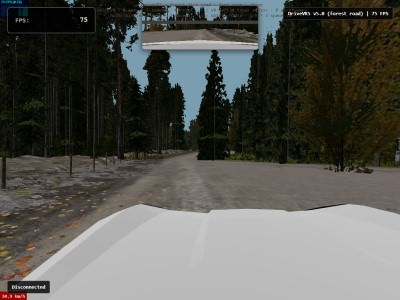
DriveVR5 is an immersive browser driving simulator built for WebXR that lets players experience smooth open-road driving directly from a browser — with or without a VR headset 🚗🌲. Explore peaceful forest roads, enjoy realistic vehicle movement, and experience the freedom of driving without downloads or installation.
Play DriveVR5 online for free on PlayMiniGames and enjoy a relaxing forest driving adventure on desktop or in virtual reality.
Play DriveVR5 Online in Browser or VR
DriveVR5 is designed to deliver an accessible driving experience across multiple devices. Jump into the driver’s seat instantly from your browser and explore a scenic dirt road surrounded by forests and atmospheric landscapes.
Unlike traditional racing games, DriveVR5 focuses on free driving, immersion, and realistic movement rather than competition or time limits.
The game supports both standard desktop controls and WebXR virtual reality for a more interactive experience.
Explore Beautiful Forest Roads
This edition of DriveVR moves away from urban environments and focuses entirely on nature exploration 🌲.
Drive through winding dirt paths surrounded by trees, atmospheric fog, and peaceful scenery designed to create a relaxing road experience.
The environment encourages players to enjoy the journey rather than rushing toward objectives.
Free Roam Driving Experience
DriveVR5 gives players complete freedom to explore.
There are no strict missions, race checkpoints, or pressure. Simply start driving and enjoy the road.
The vehicle uses physics-based handling to create more natural movement and improve immersion while driving across outdoor terrain.
Realistic Vehicle Physics
The driving system is powered by physics simulation technology to create responsive steering and believable movement.
Cars react naturally while turning, accelerating, and navigating forest roads.
This gives DriveVR5 a more authentic feeling compared to simple arcade driving games.
Experience Driving in Virtual Reality
One of the standout features of DriveVR5 is full WebXR support 🥽.
Players using compatible VR devices such as Meta Quest can enter virtual reality mode and control the vehicle from inside the cockpit.
Grab the steering wheel with your virtual hands and experience driving in a more immersive way.
Desktop and VR Controls
DriveVR5 supports multiple play styles.
- Desktop driving with keyboard controls
- VR thumbstick controls
- Interactive steering wheel driving in VR
This flexibility makes the experience accessible whether you play casually on a computer or fully immersed inside a headset.
Drive Together with Multiplayer Mode
DriveVR5 also includes multiplayer support so players can explore with others 🌍.
Join driving lobbies and cruise together across forest roads while enjoying a shared virtual environment.
Multiplayer turns a peaceful solo experience into a social road trip adventure.
Atmospheric Effects and Immersion
DriveVR5 pays special attention to atmosphere.
Features include:
- Forest fog effects
- Image-based lighting
- Optional background music
- Rearview mirror support
- Smooth performance for VR devices
These elements create a calm and immersive environment perfect for relaxing driving sessions.
Optimized for Meta Quest and WebXR
DriveVR5 is built to run efficiently on standalone VR devices and browsers.
The game uses performance optimizations designed specifically for smooth rendering and comfortable gameplay on Meta Quest and other supported WebXR platforms ⚡.
This makes it easy to jump into VR driving without installing large applications.
How to Play DriveVR5
Getting Started
- Open the game in a WebGL-supported browser.
- Wait for loading to finish.
- Press Start on the splash screen.
- Drive using desktop controls or enter VR mode.
- Explore the forest roads freely.
Controls
- W A S D – Drive
- Thumbsticks – VR movement
- Grab steering wheel – VR interaction
- Menu – Toggle rearview mirror
Why Players Love DriveVR5
Players enjoy DriveVR5 because it removes barriers between gaming and immersion. No installation, no long setup, and no complicated objectives — just open your browser and drive.
Fans searching for browser driving games, VR car simulators, WebXR experiences, free roam driving games, Meta Quest browser games, or relaxing driving simulators will find DriveVR5 especially enjoyable 🚘.
Game Features
- Free online browser driving simulator
- WebXR and VR support
- Forest dirt-road environment
- Physics-based vehicle handling
- Multiplayer lobbies
- Rearview mirror feature
- Atmospheric fog and lighting
- Desktop and VR controls
- Optimized for Meta Quest
- No installation required
FAQ About DriveVR5
Can I play DriveVR5 online for free?
Yes, DriveVR5 can be played online for free directly in your browser on PlayMiniGames.
Does DriveVR5 support VR headsets?
Yes, DriveVR5 supports WebXR devices including Meta Quest and other compatible VR headsets.
Can I play DriveVR5 without VR?
Yes, the game fully supports desktop gameplay using standard keyboard controls.
Does DriveVR5 include multiplayer?
Yes, players can join multiplayer lobbies and drive together online.