 Language
 Español
 Português
 Français
 Deutsche
 हिन्दी
 Nederland
 Русский
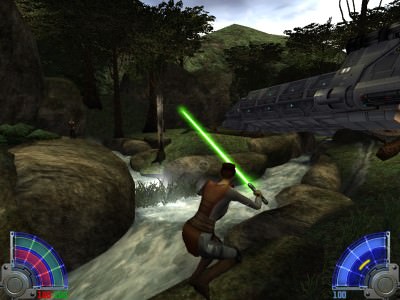
Star Wars Jedi Knight: Jedi Academy
Rating: 4.5 from 5 (based on 16 votes. 👍 14 – users like it, 👎 2 – disliked, 💬 0 – comments posted)
Released: July 2026
Star Wars Jedi Knight: Jedi Academy is a legendary third-person action game where you create your own Jedi, master the Force, and fight with one of the most satisfying lightsaber combat systems in Star Wars gaming history ⚔️. Join Luke Skywalker’s Jedi Academy, train under Kyle Katarn, travel across the galaxy, and stop a dangerous cult from stealing ancient Force energy.
Developed by Raven Software and originally published by LucasArts in 2003, Jedi Academy is the fourth main entry in the Star Wars: Jedi Knight series. It combines lightsaber duels, blaster combat, Force powers, character customization, mission choices, and multiplayer battles in one complete Star Wars adventure.
Play Star Wars Jedi Knight: Jedi Academy Online
Star Wars Jedi Knight: Jedi Academy lets you experience the path of a new Jedi student named Jaden Korr. Unlike earlier games in the series, you can customize the protagonist’s appearance, species, lightsaber hilt, blade color, and later even the type of lightsaber used in combat.
The game offers a mixture of linear story missions and selectable assignments. You visit famous planets, abandoned temples, Imperial facilities, cities, tombs, and other dangerous locations while developing your connection to the Force.
Play Star Wars Jedi Knight: Jedi Academy online on PlayMiniGames and begin your training as a student of Luke Skywalker’s new Jedi Order.
What Is Jedi Academy About?
The story begins when Jaden Korr travels to the Jedi Academy on Yavin 4 after constructing a lightsaber without formal training. During the journey, the transport is attacked, and Jaden discovers members of a mysterious cult using strange technology to drain Force energy from important locations.
At the academy, Jaden becomes a student of Kyle Katarn, one of the most experienced Jedi and former protagonists of the Jedi Knight series. Alongside another student named Rosh Penin, Jaden completes missions while investigating the cult known as the Disciples of Ragnos.
Train Under Kyle Katarn
Kyle Katarn teaches Jaden how to use a lightsaber, control Force abilities, and survive dangerous missions. His role connects Jedi Academy directly to Star Wars Jedi Knight II: Jedi Outcast.
Although Jaden begins as a student, the missions quickly become dangerous enough to test even an experienced Jedi.
Stop the Disciples of Ragnos
The main enemy faction is attempting to collect Force energy and use it to restore the ancient Sith Lord Marka Ragnos. Cult members appear throughout the galaxy, often supported by mercenaries, Dark Jedi, Imperial forces, and dangerous creatures.
Jaden must investigate their plans before they gain enough power to threaten the New Jedi Order.
Create and Customize Your Jedi
Jedi Academy gives players more control over the main character than previous entries in the series. Before beginning the story, you can customize Jaden’s appearance and select different character options.
Choose Your Character
Select from several available appearances and Star Wars species. The customization does not completely change the story, but it allows you to create a more personal Jedi character.
Design Your Lightsaber
Choose the lightsaber hilt and blade color used during the early parts of the campaign. Available colors include several recognizable Jedi and Sith-style options.
Later in the story, you can continue using a standard single lightsaber or adopt a different combat setup.
Unlock Dual Sabers or a Saber Staff
As Jaden becomes more experienced, the game allows you to select one of three lightsaber configurations:
- Single lightsaber with multiple combat styles
- Two lightsabers for fast dual-wielding attacks
- Double-bladed saber staff for wide and aggressive strikes
Each choice changes your available attacks, movement, reach, and defensive options.
Master Lightsaber Combat
Lightsaber combat is the central feature of Star Wars Jedi Knight: Jedi Academy. Battles involve movement, attack direction, timing, defensive positioning, Force abilities, and different saber styles.
You can block incoming attacks, deflect blaster fire, perform acrobatic jumps, throw your lightsaber, and duel other Force users in close combat.
Use Different Saber Styles
The single lightsaber supports multiple fighting styles that trade speed for power:
- Fast style uses quick attacks and rapid combinations
- Medium style offers balanced speed and damage
- Strong style delivers slower but more powerful strikes
Switching styles during combat helps you respond to different enemies and situations.
Deflect Blaster Fire
A Jedi can use the lightsaber defensively as well as offensively. Face incoming attacks and maintain proper positioning to block or redirect blaster shots.
Improved saber skills make it easier to defend against groups of ranged enemies.
Fight Dark Jedi
Many enemies also use lightsabers and Force powers. These duels require more careful movement than battles against ordinary soldiers.
Watch the opponent’s stance, avoid powerful attacks, and combine saber strikes with Force abilities to create openings.
Use Light and Dark Force Powers
Jedi Academy includes neutral, light-side, and dark-side abilities. Some powers are unlocked automatically, while others can be improved between missions.
Neutral Force Powers
Core abilities include Force Jump, Force Push, Force Pull, Force Speed, lightsaber throwing, and defensive saber skills.
These powers support movement, exploration, combat, and puzzle solving.
Light-Side Powers
Light-side abilities focus on defense, protection, recovery, and control. They can help Jaden survive difficult battles without relying entirely on aggressive attacks.
Dark-Side Powers
Dark-side abilities offer offensive options such as Force Lightning, Force Grip, and life-draining attacks. They can be powerful in combat but also reflect a more aggressive path through the Force.
The game allows players to combine light and dark abilities rather than locking every power behind a strict alignment system.
Complete Missions Across the Galaxy
Between major story chapters, you can choose from several optional missions. These assignments take place on different planets and offer varied objectives.
Explore Star Wars Locations
Jaden travels to deserts, cities, space stations, ancient tombs, Imperial installations, and other recognizable science-fiction environments.
Some missions include familiar Star Wars characters, vehicles, creatures, and references to the wider universe.
Choose Your Mission Order
Several assignments can be completed in the order you prefer. This creates more freedom than a completely linear campaign and lets you improve Force powers between missions.
Use Weapons and Vehicles
Although lightsabers are the main attraction, Jaden can also use blaster pistols, rifles, explosives, sniper weapons, and other equipment.
Certain missions also include vehicle sections, mounted weapons, or environmental hazards.
Light Side and Dark Side Endings
Near the end of the campaign, Jaden faces an important decision that changes the final missions and conclusion of the story.
The choice determines whether Jaden remains loyal to the Jedi or follows a darker path driven by anger and power.
Light-Side Path
The light-side route continues Jaden’s role as a Jedi and leads to a confrontation focused on stopping the cult’s plans.
Dark-Side Path
The dark-side route changes Jaden’s relationships, enemies, and motivations. It provides a different ending and encourages another campaign playthrough.
Jedi Academy Multiplayer
Star Wars Jedi Knight: Jedi Academy also became popular for its multiplayer lightsaber battles. Players can create custom characters, choose weapons and Force powers, and fight in several competitive modes.
Multiplayer Game Modes
Depending on the version and server, available modes may include:
- Free For All
- Team Free For All
- Duel
- Power Duel
- Capture the Flag
- Siege
Lightsaber Duels
Duel modes focus on direct lightsaber combat between players. Knowledge of saber styles, movement, attack timing, and Force powers becomes essential against skilled opponents.
Community Mods
The PC version developed a long-running modding community. Fan projects added maps, characters, visual improvements, combat changes, role-playing servers, and expanded multiplayer features.
Best Jedi Academy Tips
Keep Moving During Combat
Standing still makes Jaden vulnerable to blasters, explosives, and lightsaber attacks. Use strafing, jumping, and Force Speed to control distance.
Combine Force Pull with Saber Attacks
Force Pull can unbalance enemies or bring them closer. Follow it with a quick lightsaber strike before they recover.
Do Not Ignore Ranged Weapons
Lightsabers are powerful, but some enemies are easier to defeat using rifles, explosives, or long-range weapons.
Upgrade Powers That Match Your Playstyle
Players who prefer defense may benefit from healing and protection powers. Aggressive players may prefer Grip, Lightning, or enhanced saber abilities.
Save Before Difficult Choices
Keeping multiple save files makes it easier to explore both story endings and experiment with different Force upgrades.
Why Players Still Enjoy Jedi Academy
Jedi Academy remains popular because few Star Wars games offer the same level of control over lightsaber combat. The combination of directional attacks, saber styles, Force powers, acrobatics, and customization makes every duel feel dynamic.
Fans searching for Star Wars games, Jedi games, lightsaber fighting games, Jedi Academy online, Jedi Knight browser games, or classic action adventures may enjoy its mix of combat, exploration, and role-playing choices.
Star Wars Jedi Knight: Jedi Academy Features
- Create and customize your own Jedi
- Choose a lightsaber hilt and blade color
- Use single, dual, or double-bladed lightsabers
- Master light and dark Force powers
- Train under Kyle Katarn
- Complete missions across multiple planets
- Fight Stormtroopers, mercenaries, and Dark Jedi
- Choose between light-side and dark-side endings
- Use blasters, explosives, and other weapons
- Competitive multiplayer game modes
- Developed by Raven Software
- Originally released in 2003
Star Wars Jedi Knight: Jedi Academy Controls
The exact control layout may vary by platform and emulator configuration.
- W, A, S, D — Move
- Mouse — Look and aim
- Left Mouse Button — Primary attack
- Right Mouse Button — Alternate attack or selected action
- Spacebar — Jump
- Number Keys — Select weapons or lightsaber
- Assigned Force Keys — Use Force powers
- Escape — Open menu or pause
FAQ About Star Wars Jedi Knight: Jedi Academy
What type of game is Jedi Academy?
Star Wars Jedi Knight: Jedi Academy is a third-person action game featuring lightsaber combat, Force powers, shooting, exploration, character customization, and multiplayer modes.
Who is the main character?
The player controls Jaden Korr, a new student at Luke Skywalker’s Jedi Academy.
Can you customize your Jedi?
Yes. Players can customize Jaden’s appearance, species, lightsaber hilt, blade color, Force powers, and later the preferred lightsaber type.
Can you use two lightsabers?
Yes. Later in the campaign, players can choose dual lightsabers, a double-bladed saber staff, or continue using a single lightsaber.
Does Jedi Academy have multiple endings?
Yes. A major decision near the end leads to separate light-side and dark-side conclusions.
Who developed Jedi Academy?
Star Wars Jedi Knight: Jedi Academy was developed by Raven Software and originally published by LucasArts.
When was Jedi Academy released?
The game was originally released in 2003.
Is Jedi Academy connected to Jedi Outcast?
Yes. Jedi Academy continues the story world of Jedi Outcast, with Kyle Katarn returning as Jaden Korr’s Jedi instructor.