 Language
 Español
 Português
 Français
 Deutsche
 हिन्दी
 Nederland
 Русский
World Craft 2
Rating: 4.4 from 5 (based on 40 votes. 👍 33 – users like it, 👎 6 – disliked, 💬 1 – comments posted)
Released: March 2021
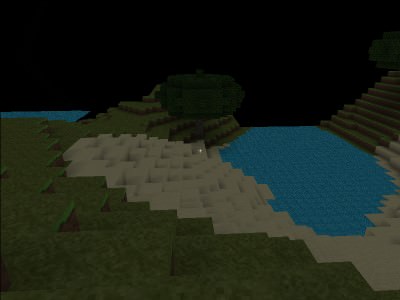
World Craft 2, also known as Worldcraft 2 or Worldkrafts 2, is a block-based open-world sandbox game inspired by Minecraft. Players can explore large 3D pixel worlds, collect resources, build structures, fight enemies, and switch between creative and survival-style gameplay.
The game combines construction, exploration, crafting, combat, and multiplayer in a familiar voxel world. Whether you want to build freely with unlimited resources or survive by gathering materials and defending yourself from hostile creatures, World Craft 2 offers several ways to play 🧱🌍.
Play World Craft 2 online on PlayMiniGames and create your own block world filled with buildings, tools, animals, enemies, and custom adventures.
What Is World Craft 2?
World Craft 2 is a sandbox building game where the environment is made from blocks. You can remove blocks, collect materials, place new blocks, and reshape the world however you want.
The game is heavily inspired by Minecraft, using a similar combination of voxel graphics, resource gathering, open exploration, and construction.
Instead of following a single fixed story, players decide their own goals. You can build a house, explore the landscape, search for resources, survive hostile nights, or join other players in multiplayer worlds.
How to Play World Craft 2
Start by choosing the type of experience you want. Creative mode focuses on unrestricted building, while survival mode requires you to gather resources and protect yourself.
Move through the generated world and interact with different block types. Mine useful materials, collect them, and use them to build shelters, structures, tools, and other creations.
In survival gameplay, you also need to watch for enemies such as zombies. Exploring too far without preparation can be dangerous, especially when hostile creatures are nearby.
The general gameplay loop is simple:
- Explore the 3D block world
- Collect useful resources
- Use blocks to build structures
- Gather tools and materials
- Fight or avoid hostile enemies
- Customize your character
- Join multiplayer worlds or play alone
Creative Mode
Creative mode is designed for players who prefer building without resource limitations. You can focus on architecture, experimentation, and large projects instead of survival.
Unlimited access to blocks makes it easier to create houses, towers, castles, roads, bridges, and other structures without spending time collecting every material manually.
This mode is useful for players who enjoy designing their own worlds and testing new building ideas.
Survival Mode
Survival mode adds resource management and danger to the sandbox experience.
You must gather materials yourself, hunt or search for useful resources, and prepare for enemies that appear in the world. Zombies are specifically mentioned among the hostile creatures you may encounter.
Building a shelter becomes more important in this mode because the world is not completely safe. A strong base can provide protection while giving you a place to store resources and prepare for future exploration.
Explore Procedurally Generated Worlds
World Craft 2 uses procedurally generated 3D environments, meaning the world can create large areas for players to explore.
This gives each play session a sense of discovery. You may find different landscapes, resources, animals, and places suitable for building.
Exploration also helps you locate materials that may not be available near your starting location. The farther you travel, the more opportunities you have to find useful places for new bases or large construction projects.
Build Your Own Structures
Construction is one of the main attractions of World Craft 2. Blocks can be placed to create almost any structure you can imagine.
You can begin with a simple shelter and gradually expand it into a larger home, fortress, village, or custom city.
Because the game includes many block types, players can experiment with different shapes, colors, and materials.
Building is especially flexible in creative mode, but survival mode can make construction feel more rewarding because every block must be collected and placed carefully.
Mine and Collect Resources
Resource gathering is essential in survival gameplay. Explore the environment and mine blocks that can be used for building or crafting-related activities.
The game includes different tools and materials, allowing players to improve how they interact with the world.
A good strategy is to gather enough resources before traveling too far. Returning to your base with useful materials is safer than exploring with no preparation.
Fight Zombies and Other Enemies
World Craft 2 includes hostile creatures such as zombies, adding combat to the survival experience.
Enemies make exploration more dangerous and create a reason to build secure shelters.
When traveling through unfamiliar areas, keep useful tools or weapons ready and avoid becoming trapped far from your base.
Players who prefer peaceful building can focus more heavily on creative mode, while survival fans can use combat as part of their progression.
Multiplayer Gameplay
World Craft 2 supports multiplayer, allowing players to explore and build with other people.
The provided description mentions both local Wi-Fi multiplayer and public online servers.
Local LAN play can be useful for playing with friends on the same network, while global servers allow players to join larger public worlds over the internet.
Multiplayer creates more possibilities for cooperative construction, exploration, and shared survival.
Play with Friends
Working together can make large building projects easier. One player can collect resources while another focuses on construction or exploration.
Friends can also build separate homes in the same world and connect them through roads, bridges, or shared areas.
In survival mode, teamwork can make hostile environments safer because players can protect each other while gathering materials.
Character Customization
The game offers multiple player skins, allowing you to change the appearance of your character.
Customization helps players create a more personal identity, especially when joining multiplayer servers.
The game also includes a wide selection of blocks, tools, animals, and other objects that can make each world feel different.
Animals and World Interaction
Animals add more life to the block world and make exploration feel less empty.
They can appear alongside the other environmental elements and contribute to the sandbox atmosphere.
The exact behavior of every animal is not described in the supplied text, but their presence expands the variety of things players can encounter while exploring.
Best World Craft 2 Tips
- Build a basic shelter early in survival mode.
- Collect extra resources before exploring distant areas.
- Use creative mode to practice building techniques.
- Keep track of your starting location so you can return easily.
- Avoid fighting too many enemies at once.
- Use multiplayer to divide building and resource tasks between friends.
- Experiment with different blocks to improve your structures.
- Explore new regions when you need materials that are not available nearby.
- Choose a player skin that is easy to recognize in multiplayer.
Why Players May Enjoy World Craft 2
World Craft 2 may appeal to players who enjoy Minecraft-style games, voxel sandboxes, block building, survival adventures, crafting games, and multiplayer exploration.
The combination of creative and survival modes makes the game suitable for different play styles. Some players can focus entirely on construction, while others can explore, gather resources, and fight enemies.
Multiplayer adds another layer by allowing friends to build and explore together.
Players searching for World Craft 2 online, Worldcraft 2 game, Minecraft-style browser games, block building games, voxel survival games, or multiplayer sandbox games may enjoy this open-ended experience.
World Craft 2 Features
- Open-world sandbox gameplay
- Block-based 3D environments
- Creative mode with unlimited resources
- Survival mode with resource gathering
- Zombies and hostile enemies
- Procedurally generated worlds
- Building and construction
- Mining and exploration
- Tools and materials
- Animals
- Character skins
- Local Wi-Fi multiplayer
- Public online servers
- Single-player and multiplayer gameplay
FAQ About World Craft 2
What type of game is World Craft 2?
World Craft 2 is a block-based open-world sandbox game focused on building, exploration, survival, and multiplayer.
Is World Craft 2 similar to Minecraft?
Yes. The game is heavily inspired by Minecraft and uses similar voxel building, resource gathering, and survival mechanics.
Does World Craft 2 have creative mode?
Yes. Creative mode allows players to build freely with unlimited resources.
Does World Craft 2 have survival mode?
Yes. Survival mode requires players to gather resources, hunt, build shelters, and fight enemies such as zombies.
Can you play World Craft 2 with friends?
Yes. The game supports multiplayer through local Wi-Fi and public online servers.
Can you customize your character?
Yes. World Craft 2 includes a selection of player skins.
Are the worlds randomly generated?
The description states that the game uses procedurally generated 3D pixel worlds.
What can you build in World Craft 2?
You can use blocks to create houses, towers, bases, roads, and other custom structures.