 Language
 Español
 Português
 Français
 Deutsche
 हिन्दी
 Nederland
 Русский

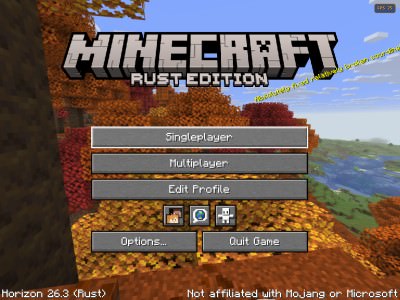
Horizon: Minecraft Rust Edition
Rating: 4.38 from 5 (based on 13 votes. 👍 11 – users like it, 👎 2 – disliked, 💬 0 – comments posted)
Released: November 2026
Horizon: Minecraft Rust Edition is an ambitious Minecraft-inspired sandbox experience based on Horizon, a project that rebuilds Minecraft: Java Edition using the Rust programming language. Designed with performance, smoother gameplay, and efficient world rendering in mind, Horizon aims to deliver the familiar Minecraft experience through a modern game engine. Explore blocky landscapes, build creative structures, and discover a different approach to Minecraft's technical foundations! ⛏️
Unlike ordinary Minecraft mods or texture packs, Horizon is a substantial rewrite of the game itself. Its developers focus on improving frame rates, reducing performance problems, and supporting familiar Minecraft features such as single-player worlds, multiplayer servers, resource packs, and native modifications.
Explore Horizon: Minecraft Rust Edition online through PlayMiniGames. The original Horizon project is designed around a dedicated launcher and requires an owned copy of Minecraft, so functionality in a browser version may differ from the native project.
What Is Horizon: Minecraft Rust Edition?
Horizon is an independent effort to recreate Minecraft: Java Edition in Rust, a programming language known for its emphasis on memory safety and efficient resource management.
The project targets compatibility with Minecraft Java 26.3 while working to improve performance across different computers.
Rather than creating a completely different block-building game, the developers aim to reproduce familiar Minecraft behavior while replacing much of the underlying technology.
The long-term objective is to make Minecraft-style gameplay run more efficiently without sacrificing the features players expect.
Explore, Build, and Survive in a Blocky World
Horizon is built around the recognizable Minecraft sandbox experience, where players explore procedurally generated environments, interact with blocks, gather resources, and construct their own creations.
The underlying Minecraft gameplay includes activities such as:
- Exploration – Discover different landscapes, caves, and generated structures.
- Block Building – Create houses, shelters, and imaginative constructions.
- Resource Gathering – Collect materials for crafting and construction.
- Crafting – Combine resources to produce useful items and equipment.
- Survival – Manage dangers while exploring the world.
- Creative Construction – Experiment with building ideas and large structures where the available game mode supports them.
Horizon aims to reproduce the original game's mechanics, although some differences in blocks, mobs, items, and world behavior are still being addressed.
Improved Performance with the Rust Engine
One of Horizon's primary goals is to improve Minecraft performance, particularly when exploring large worlds or using high render distances.
The developers are working on distributing demanding operations across multiple processor cores to reduce interruptions during gameplay.
Important optimization targets include:
- Smoother frame pacing when exploring large environments.
- Better performance at render distances around 32 chunks.
- More efficient world generation and chunk loading.
- Reduced CPU workload during block and entity processing.
- Improved memory management and rendering efficiency.
- Better performance on computers with integrated graphics.
These are ongoing development goals rather than guaranteed improvements on every computer. Actual performance depends on hardware, settings, and the version being used.
Single-Player, LAN, and Multiplayer Servers
The original Horizon project supports single-player gameplay, local network connections, and multiplayer servers.
Single-player worlds use an integrated server architecture similar to Minecraft Java, helping maintain consistent behavior between individual and multiplayer sessions.
The development team is also optimizing server performance for larger numbers of players.
Testing described in the project materials indicates that Horizon can maintain approximately 20 ticks per second with up to 50 simulated players in certain benchmarks, while performance decreases with heavier loads.
Multiplayer functionality in the PlayMiniGames browser implementation may differ from the original Horizon launcher.
Resource Packs, Mods, and Custom Worlds
Customization is another major focus of Horizon: Minecraft Rust Edition.
The project supports resource packs and its own native modification system. Developers are creating tools that allow mods to interact with different parts of the game.
Ongoing work includes compatibility with modded world generation, custom structures, additional biomes, and data-driven content.
However, conventional Java mods are not automatically compatible with Horizon. Mods requiring Java-specific functionality may need substantial changes or a native alternative.
This distinction is important for players expecting their existing Minecraft modpacks to work without modification.
Horizon vs. Minecraft Java Edition
The main difference between Horizon and traditional Minecraft Java Edition is their technical implementation.
Minecraft Java Edition uses the Java programming language, while Horizon rebuilds game functionality in Rust.
Both aim to provide familiar block-based sandbox gameplay, but Horizon is still working toward complete compatibility with the original game.
The developers are actively addressing differences involving mob behavior, blocks, items, rendering, user interfaces, and multiplayer systems.
Additional features such as native upscaling, redesigned shader support, and split-screen gameplay appear on the project's development roadmap and should not be assumed to be available in the current build.
How to Play Horizon: Minecraft Rust Edition Online
The objective depends on the gameplay mode available in your version. You may focus on exploring, collecting resources, building structures, or experimenting with the sandbox environment.
- Open Horizon: Minecraft Rust Edition on PlayMiniGames.
- Launch the available browser experience.
- Follow the on-screen instructions to enter a world or available game mode.
- Explore your surroundings and become familiar with movement and interaction.
- Collect resources and interact with blocks where supported.
- Experiment with crafting and building mechanics.
- Continue exploring and developing your world.
The source documentation does not specify controls for the browser implementation. Use the instructions displayed inside the game rather than assuming every Minecraft Java keyboard shortcut is supported.
Tips for a Better Minecraft Horizon Experience
- Start with moderate render distance settings if your device has limited performance.
- Explore nearby terrain before attempting large construction projects.
- Check which gameplay features are supported by the current build.
- Remember that native Horizon mods are different from ordinary Minecraft Java mods.
- Reduce graphics demands if you experience unstable frame rates.
- Use available performance settings to balance visuals and responsiveness.
Why Play Horizon: Minecraft Rust Edition?
Horizon stands out because it approaches the Minecraft experience from a technical perspective, seeking to preserve familiar gameplay while modernizing the underlying engine.
For players interested in Minecraft alternatives, performance-focused sandbox projects, block-building games, and new game engine technology, Horizon represents an unusual take on the classic formula.
Play Horizon: Minecraft Rust Edition on PlayMiniGames and discover how a Rust-based approach can bring a different experience to familiar Minecraft-style adventures! 🎮
Frequently Asked Questions About Horizon: Minecraft Rust Edition
What is Horizon: Minecraft Rust Edition?
Horizon is a project that rewrites Minecraft: Java Edition in Rust, aiming to improve performance while reproducing familiar Minecraft gameplay, world generation, and multiplayer features.
Can you play Horizon: Minecraft Rust Edition in a browser?
PlayMiniGames provides a page for the browser experience. The original Horizon project uses a dedicated launcher, and browser functionality may differ from the native version.
Is Horizon a Minecraft mod?
No. Horizon is a separate technical reimplementation of Minecraft Java functionality rather than a traditional mod or resource pack.
Does Horizon support multiplayer?
The original project supports single-player worlds, LAN gameplay, and multiplayer servers. Browser multiplayer availability depends on the implementation.
Does Horizon run faster than regular Minecraft?
Horizon is designed to improve efficiency through Rust-based development and multithreaded optimization. Performance advantages vary by hardware and game version.
Can Minecraft Java mods run in Horizon?
Not automatically. Horizon supports its own native mods and is developing additional modpack compatibility, but Java-specific mod functionality may not work.
Is Horizon the same as the Rust survival game?
No. Rust in the Horizon title refers to the programming language used to develop the engine, not the separate multiplayer survival game Rust.