 Language
 Español
 Português
 Français
 Deutsche
 हिन्दी
 Nederland
 Русский
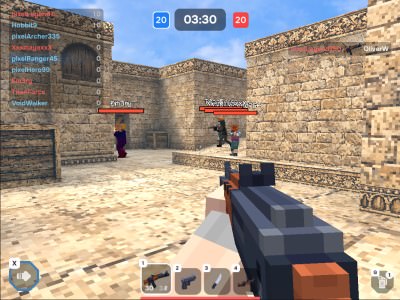
Pixel World
Rating: 4.43 from 5 (based on 14 votes. 👍 12 – users like it, 👎 2 – disliked, 💬 0 – comments posted)
Released: July 2026
Pixel World is a fast multiplayer first-person shooter with colorful voxel graphics, compact battle maps, and nonstop online action 🔫🧱. Choose your weapons, enter a match, and fight other players in classic FPS modes such as Deathmatch, Team Fight, Flag Capture, and Control Points.
The game runs directly in your browser with no download required. You can also play Pixel World through Telegram, join private rooms with friends, complete daily quests, compete on leaderboards, and build a loadout that matches your preferred combat style.
Play Pixel World Online for Free
Pixel World delivers quick multiplayer FPS matches designed to keep players close to the action. Small and medium-sized maps reduce long periods of searching for opponents, so battles begin quickly and continue until the timer ends.
Each match rewards movement, aim, map awareness, and smart weapon selection. You can rush enemies with a shotgun, control long sightlines with a sniper rifle, or use assault rifles and submachine guns for balanced mid-range combat.
Play Pixel World online on PlayMiniGames and compete against other players directly from your desktop, phone, or tablet.
How to Play Pixel World
Your main objective depends on the selected game mode. You may need to earn the most eliminations, help your team defeat opponents, capture the enemy flag, or hold important control zones.
Before entering a match, choose weapons for your four available loadout slots. Once the battle begins, move quickly, use cover, reload at safe moments, and switch weapons whenever the situation changes.
Move Quickly Around the Map
Pixel World includes more movement options than a basic browser shooter. You can walk, sprint, jump, slide, and dash to avoid bullets or surprise enemies.
Fast movement is especially important on smaller maps, where opponents can appear from nearby corners at any moment.
Aim and Fire at Opponents
Use the mouse to aim and shoot on desktop. Right-clicking allows you to aim more precisely with compatible weapons, while the left mouse button fires.
Different weapons handle differently, so avoid using every gun in the same way. A sniper rifle rewards patience and distance, while a shotgun is most effective at close range.
Use Dash During Gunfights
Press X to dash during combat. This quick movement can help you escape enemy fire, cross dangerous gaps, or make yourself harder to track.
Many players focus only on aiming and forget to use the dash. Learning when to activate it can help you win close duels even against opponents with accurate weapons.
Pixel World Game Modes
Pixel World includes several multiplayer modes with different objectives. Choosing the right strategy for each mode is more important than simply chasing eliminations.
Deathmatch
Deathmatch is a free-for-all mode where every player fights alone. The player with the highest number of eliminations when the timer ends wins.
Keep moving, avoid being trapped between multiple opponents, and finish weakened enemies quickly before another player takes the elimination.
Team Fight
Team Fight divides players into two teams. Both sides compete to reach the highest elimination score.
Stay close enough to support teammates without standing in the same position. Coordinated groups can overwhelm isolated opponents and control important parts of the map.
Flag Capture
In Flag Capture, your team must steal the enemy flag and return it while protecting your own.
A balanced strategy works best. Some players should attack the enemy base, while others remain behind to defend your flag from fast opponents.
Control Points
Control Points requires teams to capture and hold marked areas. Remaining inside controlled zones earns points over time.
Defending a point is often more important than chasing enemies across the map. Use cover, grenades, and coordinated attacks to remove opponents from the objective.
Private Match
Private Match allows you to create a custom room and invite friends. It is a good option for friendly competitions, practice sessions, or matches with your own rules.
Weapons and Loadouts
Pixel World gives you four weapon slots that can be filled with equipment from several categories. Each weapon has different damage, range, fire rate, accuracy, and handling characteristics.
Assault Rifles
Assault rifles offer balanced performance at short and medium range. They are useful for players who want reliable damage without committing to one specialized style.
Submachine Guns
Submachine guns fire quickly and work well during aggressive close-range fights. Combine them with sprinting, sliding, and dashing to pressure enemies.
Shotguns
Shotguns can deal heavy damage at close range but become less effective across long distances. Use corners and narrow routes to approach enemies safely.
Sniper Rifles
Sniper rifles reward accuracy and positioning. Find long sightlines, aim carefully, and avoid remaining in the same location after firing.
Pistols
Pistols provide a useful backup when your primary weapon runs out of ammunition. Switching to a pistol may be faster than reloading during a close fight.
Grenades and Melee Weapons
Grenades can damage enemies behind cover or clear crowded objectives 💥. Melee weapons are useful at extremely close range or when you need to move quickly without holding a heavy firearm.
Build a Loadout for Your Playstyle
A strong loadout should support one clear strategy. Randomly selecting four powerful-looking weapons may leave you without the right tool for certain situations.
Close-Range Loadout
Combine a shotgun or submachine gun with a pistol, grenade, and melee weapon. Use sprint, slide, and dash to close the distance before attacking.
Long-Range Loadout
Use a sniper rifle with an assault rifle or pistol as backup. Avoid small rooms and choose positions where you can see enemies approaching.
Balanced Loadout
An assault rifle, shotgun or SMG, pistol, and grenade provide options at multiple ranges. This setup is useful when learning unfamiliar maps.
Daily Quests and Gold Rewards
Daily quests provide additional goals during normal matches. Tasks may ask you to play on a certain map, use a specific weapon, complete matches, or earn a number of eliminations.
Completing these challenges rewards gold that can be used within the game’s progression system.
Check Quests Before Playing
Review the daily list before entering a match. You may be able to complete several objectives at the same time by selecting the correct map and loadout.
Use Required Weapons Early
If a quest requires eliminations with a specific weapon, equip it before starting. Delaying the challenge can make it harder to finish before the daily reset.
Squads, Clans, and Competitive Rankings
Pixel World includes social and competitive systems for players who want more than casual matchmaking.
Join a Squad
Squads allow players to connect with others, play together, and compare collective progress.
Create or Join a Clan
Clans are designed for more organized competition. Join an existing group or create your own and work together to improve its ranking.
Compete on Leaderboards
Leaderboards reset on daily, weekly, and monthly schedules. Separate rankings may track individual players, squads, and clans.
Consistent play matters because shorter ranking periods reward players who perform well during the current cycle rather than relying only on old results.
Play Pixel World on Mobile and Telegram
Pixel World supports desktop browsers, phones, and tablets. It can also be launched through Telegram, allowing players to access the same game from another platform.
Mobile Gameplay
On mobile devices, play in landscape orientation for a wider view of the battlefield. Touch controls handle movement, aiming, firing, jumping, and other actions.
Desktop players usually have an advantage in precise aiming because of the keyboard and mouse, but mobile movement remains fully playable with practice.
Telegram Version
The Telegram version allows players to launch Pixel World without leaving the app. This can make it easier to join matches or invite friends who already use Telegram.
Best Pixel World Tips
Use Dash in Every Close Fight
Press X when an enemy begins tracking you. A sudden dash can break their aim and create time for another shot.
Do Not Reload in the Open
Move behind a wall or object before reloading. Reloading leaves you unable to fire and makes you an easy target.
Switch Weapons Instead of Waiting
If your current weapon runs empty during a duel, switch to another slot instead of immediately reloading.
Learn the Map Routes
Memorize spawn areas, control points, flag paths, sniper positions, and common corners. Map knowledge helps you predict where enemies will appear.
Use Grenades on Objectives
Grenades are especially effective in Flag Capture and Control Points, where several enemies may gather in one location.
Build Around One Combat Style
Choose weapons that support how you prefer to move and fight. A focused loadout is usually more effective than carrying unrelated weapons.
Why Players May Enjoy Pixel World
Pixel World combines the speed of an online arena shooter with accessible browser gameplay and a colorful voxel style. Matches begin quickly, movement feels active, and multiple modes provide different objectives.
Players searching for multiplayer FPS games, voxel shooters, browser shooting games, block-style gun games, Telegram games, private multiplayer matches, or mobile FPS games may enjoy its quick battles and competitive progression.
Pixel World Game Features
- Fast multiplayer first-person shooter gameplay
- Blocky voxel graphics
- Deathmatch and team-based modes
- Flag Capture and Control Points
- Private matches with friends
- Four customizable weapon slots
- Assault rifles, SMGs, shotguns, snipers, and pistols
- Grenades and melee weapons
- Sprinting, jumping, sliding, and dashing
- Daily quests and gold rewards
- Squads and clans
- Daily, weekly, and monthly leaderboards
- Browser, mobile, tablet, and Telegram support
- Rebindable desktop controls
Pixel World Controls
- W, A, S, D — Move
- Space — Jump
- Left Shift — Sprint
- X — Dash
- Left Mouse Button — Fire
- Right Mouse Button — Aim
- R — Reload
- G — Throw Grenade
- 1, 2, 3, 4 — Switch Weapons
Every key can be reassigned in the game settings.
FAQ About Pixel World
What type of game is Pixel World?
Pixel World is a multiplayer first-person shooter with voxel graphics, fast movement, customizable loadouts, and several competitive game modes.
Can I play Pixel World online without downloading it?
Yes. Pixel World runs directly in a supported web browser without requiring a download or installation.
What game modes are available?
The available modes include Deathmatch, Team Fight, Flag Capture, Control Points, and Private Match.
How many weapon slots are available?
Players can equip four weapon slots and switch between them during matches.
How do you dash in Pixel World?
Press the X key on desktop to perform a quick dash during movement or combat.
Can Pixel World be played on mobile?
Yes. Pixel World supports compatible phones and tablets through browser-based touch controls.
Can I play Pixel World through Telegram?
Yes. The game can also be launched inside Telegram.
Does Pixel World have private matches?
Yes. Players can create custom private rooms and invite friends.
Can the controls be changed?
Yes. Desktop keyboard controls can be rebound through the settings menu.