 Language
 Español
 Português
 Français
 Deutsche
 हिन्दी
 Nederland
 Русский
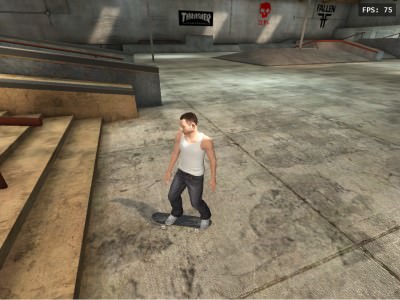
Skate 3
Rating: 4.33 from 5 (based on 12 votes. 👍 10 – users like it, 👎 2 – disliked, 💬 0 – comments posted)
Released: October 2026
Skate 3 is a legendary 3D skateboarding game where you can explore a massive city, perform incredible tricks, build custom skateparks, and experience realistic skating physics. Originally developed by EA Black Box and released by Electronic Arts in 2010, Skate 3 became one of the most popular skateboarding games thanks to its freedom of movement, creative challenges, and hilarious ragdoll crashes. 🛹
Explore the streets of Port Carverton, master kickflips and heelflips, grind along rails, and experiment with complicated trick combinations. Whether you prefer realistic street skating or spectacular jumps, Skate 3 gives you plenty of opportunities to develop your skills.
Play Skate 3 online in your browser on PlayMiniGames and experience the excitement of this classic skateboarding adventure without installing the original console game. Some features may differ depending on the browser version.
What Is Skate 3?
Skate 3 is an open-world skateboarding simulation game originally released for PlayStation 3 and Xbox 360. It is the third main installment in EA's Skate series and emphasizes realistic board control, physics-based tricks, and creative freedom.
Unlike traditional arcade skateboarding games, Skate 3 focuses on making every movement feel connected to the board. Landing a complicated trick requires practice, while mistakes can send your character tumbling across the pavement.
The game takes place in Port Carverton, a fictional city designed specifically for skateboarding. Its streets, plazas, parks, and industrial environments offer countless places to practice tricks and explore.
Explore Port Carverton – A City Built for Skateboarding
Port Carverton is one of the most recognizable locations in the Skate series. Instead of restricting players to small skateboarding courses, the game offers an expansive urban environment filled with opportunities for creative skating.
You can explore several types of locations:
- City Streets – Discover stairs, benches, curbs, and urban obstacles suitable for technical street tricks.
- School and Campus Areas – Practice jumps and grinds around large buildings, pathways, and staircases.
- Industrial Zones – Explore abandoned structures and unusual skating environments.
- Skateparks – Practice tricks using ramps, rails, platforms, and other purpose-built obstacles.
Each environment rewards a different approach. Some areas are perfect for learning simple tricks, while others encourage ambitious combinations that require precise timing and board control.
Master the Flick-It Trick System
One of Skate 3's most important features is the Flick-It control system.
In the original console version, players use the right analog stick to perform tricks. Rather than pressing a single button to execute a kickflip, you recreate the motion of a skateboarder's foot through directional stick movements.
This system makes tricks feel more physical and gives players greater control over their performance.
Learning to perform ollies, kickflips, heelflips, and combinations takes practice, but mastering the controls opens up more creative possibilities.
In the described browser version, keyboard arrow keys are used for Flick-It trick inputs, replacing the original console's analog-stick movements.
Realistic Skateboarding Physics
Skate 3 stands out because of its physics-based approach to skating.
Your character reacts to movement, speed, and collisions, making the outcome of each trick depend on how well you execute it.
Successfully landing after a difficult jump can be satisfying, especially when you have spent several attempts perfecting the timing.
However, mistakes can produce equally memorable moments. Landing at the wrong angle, colliding with an obstacle, or losing control can result in spectacular falls.
This combination of skill-based tricks and unpredictable accidents gives Skate 3 much of its distinctive personality.
Hall of Meat – The Funniest Crashes in Skate 3
Hall of Meat is one of Skate 3's most famous features. Instead of rewarding perfect skateboarding, this mode celebrates spectacular crashes and painful-looking wipeouts.
The original game evaluates different aspects of your falls, including distance, impact, and injuries sustained by your character.
Its exaggerated ragdoll physics can produce bizarre situations as your skater tumbles down stairs, collides with structures, or falls from elevated areas.
Hall of Meat transforms failed tricks into a separate source of entertainment. Sometimes the most memorable moment is not the trick you successfully landed, but the spectacular crash that followed a failed attempt.
Create Custom Skateparks
Skate 3 also features a Skate.Park editor in the original game, allowing players to create customized skating environments.
You can arrange different structures and obstacles to design a park suited to your preferred style of skating.
These include ramps, rails, and other skating features that can be combined into original layouts.
Custom skateparks provide opportunities to experiment with difficult tricks, create unusual challenges, and explore new ways to use the game's physics system.
The availability of the full park editor may vary in browser adaptations.
How to Play Skate 3 Online
The browser version described here uses keyboard controls adapted from the original game's console interface.
Skate 3 Keyboard Controls:
- W / A / S / D – Move, steer, push off, and crouch.
- Arrow Keys – Perform Flick-It skateboard tricks.
- Space – Push to gain speed.
- Shift / C – Perform grab tricks.
- I / J / K / L – D-pad controls.
- Esc – Open the pause menu.
- Tab – Go back.
- F8 – Toggle the debug camera.
- T – Drop your skater at the camera position.
Start by practicing movement and simple jumps before attempting complicated trick combinations. Understanding how your character reacts to speed and directional inputs will make advanced maneuvers easier to perform.
Tips and Tricks for Beginners
- Start with simple ollies before moving on to kickflips and heelflips.
- Practice the timing of Flick-It inputs to improve consistency.
- Build enough speed before attempting large gaps and jumps.
- Explore different areas of Port Carverton to discover suitable skating obstacles.
- Practice balancing your movements when approaching rails and ledges.
- Try combining jumps, flips, and grabs for more creative tricks.
- Experiment with the physics system to understand why certain landings fail.
- Use open skateparks to practice before attempting difficult street challenges.
Skate 3 vs. Tony Hawk Games
Skate 3 and the Tony Hawk series are both famous skateboarding franchises, but they approach gameplay differently.
Many Tony Hawk games emphasize fast arcade-style combinations, large scores, and spectacular trick sequences controlled through button inputs.
Skate 3 focuses more heavily on realistic board movement, physics-based tricks, and the Flick-It system.
This makes Skate 3 appealing to players who enjoy learning individual tricks, experimenting with different locations, and developing precise control over their skater.
Why Play Skate 3?
Skate 3 offers the freedom to enjoy skateboarding without following a strictly linear experience. You can explore the city, practice technical tricks, experiment with skating physics, or simply enjoy unexpected crashes.
Its open-world design, memorable environments, and distinctive control system helped it develop a lasting following among fans of sports and simulation games.
If you enjoy 3D skateboarding games, BMX and extreme sports games, realistic skating simulators, open-world sports adventures, or classic EA games, Skate 3 remains a recognizable favorite.
Discover Skate 3 on PlayMiniGames and see how many tricks you can master in Port Carverton.
Skate 3 Game Features
- 3D skateboarding simulation gameplay
- Developed by EA Black Box
- Published by Electronic Arts in 2010
- Originally released for PlayStation 3 and Xbox 360
- Explore the fictional city of Port Carverton
- Realistic skateboarding physics
- Flick-It trick control system
- Kickflips, heelflips, grabs, and grinds
- Urban streets, campuses, industrial areas, and skateparks
- Ragdoll physics and spectacular crashes
- Hall of Meat challenges in the original game
- Custom Skate.Park editor in the original game
- Keyboard controls in the described browser adaptation
- Skate 3 browser gameplay on PlayMiniGames
Frequently Asked Questions About Skate 3
What is Skate 3?
Skate 3 is a 3D skateboarding simulation game developed by EA Black Box and released by Electronic Arts in 2010. Players explore Port Carverton, perform tricks, and experience realistic skating physics.
Can you play Skate 3 online in a browser?
Skate 3 is presented as a browser-playable game on PlayMiniGames. Available features may differ from the original console release.
When was Skate 3 released?
Skate 3 was released in 2010 for PlayStation 3 and Xbox 360.
Where does Skate 3 take place?
The game takes place in Port Carverton, a fictional city featuring streets, campuses, industrial areas, and skateparks.
What is the Flick-It system in Skate 3?
Flick-It is a trick control system that uses directional movements to simulate skateboard foot motions. The original console game uses the right analog stick, while the described browser version uses arrow keys.
What is Hall of Meat in Skate 3?
Hall of Meat is a feature in the original game that rewards spectacular crashes and uses ragdoll physics to create exaggerated skateboarding accidents.
Can you build your own skatepark in Skate 3?
Yes. The original game includes a Skate.Park editor that allows players to create custom skateboarding environments using ramps, rails, and other obstacles.
How do you perform tricks in the browser version of Skate 3?
Use the arrow keys for Flick-It trick inputs. WASD controls movement, Space is used to push, and Shift or C performs grabs.