 Language
 Español
 Português
 Français
 Deutsche
 हिन्दी
 Nederland
 Русский
World Craft
Rating: 4.2 from 5 (based on 15 votes. 👍 12 – users like it, 👎 3 – disliked, 💬 0 – comments posted)
Released: March 2021
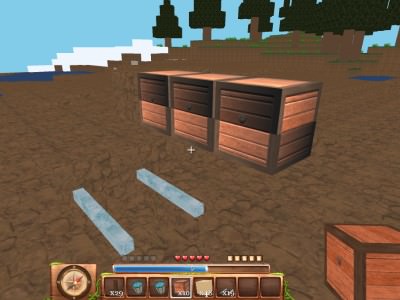
WorldCraft is a 3D block-based sandbox game inspired by Minecraft, where players can explore open worlds, collect resources, craft useful items, survive against hostile creatures, and build almost anything from blocks. The game combines survival, creative construction, multiplayer exploration, and social features in one flexible sandbox experience 🧱🌍.
Players can choose between surviving in a dangerous world with limited resources or entering creative mode with unlimited building materials. Multiplayer servers add another layer by allowing people to explore community-created worlds, build together, and communicate through chat.
Play WorldCraft online on PlayMiniGames and create your own block world filled with buildings, tools, resources, monsters, and other players.
Play WorldCraft Online
WorldCraft gives players freedom to decide how they want to play. There is no single fixed story that everyone must follow. You can focus on construction, exploration, survival, crafting, multiplayer, or a combination of all of them.
The environment is made from 3D blocks that can be collected and placed in new locations. This allows players to reshape the world and create houses, towers, farms, roads, fortresses, monuments, and other structures.
The game is available for mobile and PC devices, with gameplay designed around both solo adventures and shared multiplayer worlds.
How to Play WorldCraft
Start by choosing a game mode. Survival mode requires you to gather resources and protect yourself, while creative mode gives you unlimited materials for unrestricted building.
In survival, explore the environment and collect useful blocks and resources. Craft tools, equipment, and armor, then build a shelter before hostile mobs become a serious problem.
In creative mode, you can ignore survival requirements and concentrate entirely on designing structures and experimenting with blocks.
The main gameplay loop includes:
- Explore the open block world
- Collect useful resources
- Craft tools and equipment
- Build shelters and larger structures
- Fight hostile mobs in survival mode
- Choose and customize your character skin
- Join multiplayer worlds
- Chat and build with other players
Survival Mode
Survival mode turns WorldCraft into a resource-management and exploration challenge. You begin with limited equipment and must gather what you need from the environment.
Resources can be used to craft tools, armor, and other useful items. As you explore farther from your starting position, preparation becomes increasingly important.
Hostile mobs add danger to the world. A simple shelter can protect you early on, while stronger equipment helps when exploring more dangerous areas.
Hunting and resource gathering also become part of progression. Instead of receiving unlimited blocks, every useful item has to be found or created.
Creative Mode
Creative mode is designed for players who primarily want to build. Resources are unlimited, allowing you to experiment without spending time mining materials.
You can create small houses or work on much larger projects such as castles, cities, towers, bridges, and custom landscapes.
Because there is no need to worry about survival resources, creative mode is especially useful for testing designs before attempting similar projects in survival.
Creative gameplay can be enjoyed alone or with other players online.
Build Anything You Want
Construction is one of the main attractions of WorldCraft. The block-based environment allows structures to be created piece by piece.
You can start with a basic home and gradually expand it into a larger base. Different blocks can be combined to create walls, floors, roofs, decorative elements, roads, or entire settlements.
Large projects become easier in creative mode, while survival construction can feel more rewarding because the necessary resources must first be collected.
Gather Resources and Craft Items
Resource gathering is essential in survival mode. Explore the world and collect materials that can be turned into useful equipment.
Crafting lets players convert raw resources into tools, armor, and other items needed for exploration and protection.
A useful strategy is to gather extra materials before leaving your base. Running out of equipment far from home can make survival much more difficult.
Keep valuable supplies organised and gradually improve your equipment as better resources become available.
Fight Hostile Mobs
The world is not completely peaceful. Survival mode includes hostile mobs that can attack players during exploration.
Combat encourages you to prepare before traveling into unknown areas. Armor, tools, and a safe base can make the difference between a successful expedition and losing progress.
Players who prefer construction without enemies can focus on creative mode instead.
WorldCraft Multiplayer
WorldCraft supports online multiplayer, allowing players to connect with people around the world.
You can enter shared maps, explore structures created by other users, and work together on new projects.
Multiplayer makes the sandbox feel more dynamic because every world can contain different building styles and ideas.
Instead of creating everything alone, friends can divide tasks. One player may gather resources while another builds walls, expands the base, or explores new areas.
Chat with Other Players
WorldCraft includes real-time chat in multiplayer worlds.
This allows players to coordinate building projects, communicate during exploration, or simply talk while playing.
Chat can be especially useful during larger construction projects where several people need to agree on what to build and where different structures should be placed.
Explore Player-Created Maps
Multiplayer is not only about inviting someone into your own world. Players can also explore maps created by the community.
These worlds may contain cities, unusual buildings, decorative landscapes, survival bases, or other creative projects.
Exploring community maps can provide inspiration for your own designs and introduce building techniques you may not have considered.
Choose from Hundreds of Skins
WorldCraft includes a large selection of character skins. The provided description mentions hundreds of different options.
Skins change the visual appearance of your player character and help you stand out when playing on multiplayer servers.
You can choose a style that matches your personality, current world, or role in a multiplayer group.
Best WorldCraft Tips
- Build a simple shelter early in survival mode.
- Collect more resources than you immediately need.
- Craft better tools as soon as suitable materials become available.
- Keep important resources stored safely at your base.
- Use creative mode to practice complicated building designs.
- Explore community maps for new construction ideas.
- Work with other players on larger multiplayer projects.
- Prepare armor before exploring areas with hostile mobs.
- Choose a recognizable skin when playing online.
- Use chat to coordinate building and exploration with teammates.
Why Players May Enjoy WorldCraft
WorldCraft may appeal to players who enjoy Minecraft-style games, voxel sandboxes, block building, crafting, open-world exploration, survival games, and multiplayer construction.
The ability to switch between creative and survival gameplay makes the game suitable for different types of players. Builders can focus on unlimited construction, while survival fans can gather resources, craft equipment, and fight hostile creatures.
Multiplayer and community-created maps add replay value because players can continuously discover new worlds and building ideas.
Players searching for WorldCraft online, World Craft game, Minecraft-like games, free block building games, multiplayer crafting games, voxel survival games, or 3D sandbox games may enjoy its open-ended gameplay.
WorldCraft Features
- 3D block-based sandbox gameplay
- Open-world exploration
- Survival mode
- Creative mode
- Unlimited blocks in creative gameplay
- Resource gathering
- Item crafting
- Tools and armor
- Hostile mobs
- Single-player gameplay
- Online multiplayer
- Real-time player chat
- Community-created maps
- Hundreds of character skins
- Building and construction mechanics
- Mobile and PC support
FAQ About WorldCraft
What type of game is WorldCraft?
WorldCraft is a 3D block-based sandbox game focused on building, exploration, crafting, survival, and multiplayer.
Is WorldCraft similar to Minecraft?
Yes. WorldCraft uses a similar block-based visual style and includes building, resource gathering, crafting, survival, and creative gameplay.
Does WorldCraft have survival mode?
Yes. Survival mode requires players to collect resources, craft tools and armor, hunt, and defend themselves from hostile mobs.
Does WorldCraft have creative mode?
Yes. Creative mode provides unlimited blocks and resources for unrestricted building.
Can you play WorldCraft with other people?
Yes. WorldCraft supports online multiplayer where players can explore and build together.
Does WorldCraft have multiplayer chat?
Yes. Players can communicate through real-time chat while playing online.
Can you explore other players' maps?
Yes. WorldCraft includes community-created maps that can be explored online.
Can you customize your character?
Yes. The game offers hundreds of different player skins.