 Language
 Español
 Português
 Français
 Deutsche
 हिन्दी
 Nederland
 Русский
Choicer Voicer Game
Rating: 4.47 from 5 (based on 15 votes. 👍 13 – users like it, 👎 2 – disliked, 💬 0 – comments posted)
Released: September 2026
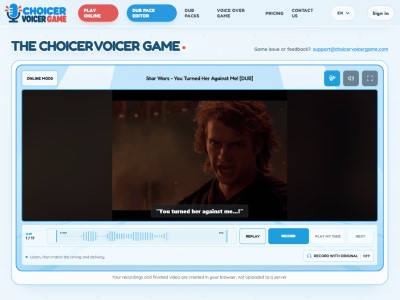
Choicer Voicer Game is a browser-based voice-over game where you become the voice actor. Pick a community-made Dub Pack, watch a short video scene, listen to the original reference line, and record your own performance with a microphone. 🎙️🎬 You can imitate the character, experiment with a completely new voice, or record the same line again until the timing feels right.
Instead of controlling a character through traditional action gameplay, Choicer Voicer turns dubbing itself into the challenge. Each scene is divided into dialogue clips that you complete one at a time. Once every line has been recorded, you can watch the finished scene with your own voice-over and download the resulting video.
Play Choicer Voicer online on PlayMiniGames directly in your browser. No installation is required, making it easy to start recording, experimenting with character voices, and creating your own version of a scene.
What Is Choicer Voicer Game?
Choicer Voicer is an interactive dubbing and voice-over game designed around short video scenes.
The main idea is simple: instead of merely watching characters speak, you record their dialogue yourself.
The game provides a reference performance for each clip. You can listen to it first, record your version through a microphone, and immediately replay the result to hear how well your voice fits the scene.
This makes Choicer Voicer a combination of a browser game, voice acting activity, timing challenge, and creative video tool.
Choose a Community-Made Dub Pack
Your session begins by choosing a Dub Pack.
The supplied description states that Dub Packs are community-made and contain the scenes you can dub.
After choosing one, you can preview its scene before beginning the recording process.
This structure means the game can offer different dubbing experiences depending on which available pack you select, while keeping the same basic record-and-replay gameplay.
Preview the Scene Before Recording
Watching the scene first can help you understand its pacing and context.
You can observe when characters begin speaking, how long their lines last, and what kind of emotion or delivery might fit the scene.
You are not required to reproduce the original performance exactly. The preview simply gives you useful context before you start making your own version.
Dub the Dialogue One Clip at a Time
Choicer Voicer divides the dialogue into individual clips.
Instead of attempting to dub an entire video in one uninterrupted recording, you work through the scene line by line.
This makes the process more manageable because you can concentrate on one short performance at a time.
Once a clip is complete, you can move on to the next part of the dialogue until the whole scene has been dubbed.
Listen to the Reference Audio
Before recording a line, you can listen to its reference audio.
The reference helps with timing and gives you an example of how the dialogue fits the video.
You can use it as a guide if you want to reproduce the original rhythm, or simply use it to understand where your line should begin and end before creating a different interpretation.
Record Your Own Voice
The microphone is the central input method in Choicer Voicer.
When it is time to perform a line, record yourself speaking the dialogue.
Because the game runs in a browser, microphone access may need to be permitted when your browser asks for it.
Your objective is not necessarily to sound exactly like the reference character. A serious performance, exaggerated voice, unusual accent, dramatic interpretation, or comedic version can all create a different result.
Timing Matters
Choicer Voicer is not only about reading words aloud.
Your recording needs to fit the video clip, which introduces a timing challenge.
A line delivered too slowly may continue after the corresponding moment has ended, while speaking too quickly can make the dub feel disconnected from the character's actions.
Listening carefully to the reference and watching the video can help you judge the rhythm before recording.
Replay Your Recording
After recording a line, you can listen to your take.
This is useful for checking both timing and performance.
You might discover that the line started too late, an important word was difficult to hear, or a different voice would fit the scene better.
Because you can hear the result immediately, the recording process becomes an iterative challenge rather than a single attempt.
Record Another Take
If you are not satisfied with a recording, you can try again.
Multiple takes let you improve synchronization, change the delivery, or experiment with an entirely different character voice.
For example, the same dialogue could be performed dramatically during one attempt and turned into a comedy performance during the next.
This freedom is one of the main creative elements of Choicer Voicer.
Match the Character or Invent a New Voice
There is no need to approach every scene as a strict imitation challenge.
You can attempt to match the delivery of the original character, but you can also reinterpret the scene with your own voice.
Changing emotion, pacing, vocal style, or character personality can make a familiar-looking scene feel very different.
This means the challenge can be approached seriously as voice-over practice or casually as a creative game with friends.
Watch Your Completed Dub
After all required clips have been recorded, you can watch the completed scene with your performances inserted into it.
This final playback brings the individual recordings together and lets you hear how your complete dub works as one sequence.
A line that sounded good by itself may feel different when placed between the surrounding dialogue, which can make the final playback one of the most interesting parts of the experience.
Download Your Dubbed Video
The supplied description states that the finished video can be downloaded after completing the scene.
This allows you to keep the result instead of losing your dub when the session ends.
You can create different versions by experimenting with new performances and downloading the results you prefer.
How to Play Choicer Voicer
The basic process is straightforward:
- Choose a community-made Dub Pack.
- Preview the included video scene.
- Start the dialogue sequence.
- Listen to the reference audio for the current clip.
- Allow microphone access if your browser requests it.
- Record your version of the dialogue.
- Replay the recording and check its timing.
- Record another take if you want to improve it.
- Continue until every dialogue clip is complete.
- Watch the completed dubbed scene.
- Download the finished video if you want to keep it.
The supplied description does not provide specific keyboard shortcuts, so players should use the controls displayed in the browser interface.
Tips for Better Dubs
- Listen to the reference line before recording your first take.
- Watch the character's movements to understand the timing.
- Record in a quiet environment when possible.
- Keep your microphone close enough for clear speech without speaking directly into it.
- Do not worry about getting every line right on the first attempt.
- Replay each take before moving to the next clip.
- Experiment with different voices and emotions.
- Focus on timing if you want the performance to fit the video naturally.
- Use another take when a recording feels rushed or too slow.
A Voice Acting Game in Your Browser
Choicer Voicer is unusual because your own voice becomes the main game input.
There are no traditional racing controls, combat combos, or platforming jumps to master. Instead, success comes from listening, performing, timing dialogue, and deciding how you want each character to sound.
This makes it relevant to players interested in voice acting games, dubbing games, microphone games, creative browser games, and interactive video experiences.
No Installation Required
Choicer Voicer runs directly in the browser according to the supplied description.
You do not need to install a separate game client before starting.
A microphone is important because recording your own dialogue is the central mechanic.
Players searching for Choicer Voicer online, browser dubbing game, voice acting game online, microphone game, dub video game, record your voice game, or online voice-over game may find this title especially relevant.
Choicer Voicer Game Features
- Browser-based voice-over gameplay
- Community-made Dub Packs
- Short video scenes
- Scene preview
- Dialogue divided into individual clips
- Reference audio for each line
- Microphone recording
- Immediate playback of recorded takes
- Multiple recording attempts
- Creative character voices
- Timing-based dubbing challenge
- Completed scene playback
- Finished video download
- No installation required
- Free browser play according to the supplied description
FAQ About Choicer Voicer Game
What is Choicer Voicer Game?
Choicer Voicer Game is a browser-based voice-over game where you dub short video scenes by recording the characters' dialogue with your own voice.
How do you play Choicer Voicer?
Choose a Dub Pack, preview the scene, listen to each reference line, record your own version with a microphone, and continue until the entire scene has been dubbed.
Do you need a microphone for Choicer Voicer?
Yes. A microphone is needed to record the dialogue that replaces or accompanies the reference performance.
Can you listen to your recording?
Yes. After recording a line, you can replay your take to check its timing and performance.
Can you record a line again?
Yes. You can make another take whenever you want to improve the timing, delivery, or character voice.
Do you have to copy the original character voice?
No. You can try to match the reference performance or invent a completely different voice and interpretation.
What are Dub Packs?
Dub Packs are community-made collections or scenes that provide the video and dialogue content used for dubbing in the game.
Can you watch the complete dub?
Yes. After finishing all of the dialogue clips, you can watch the completed scene with your recorded performances.
Can you download the finished video?
Yes. The supplied description states that the completed dubbed video can be downloaded.
Does Choicer Voicer require installation?
No. According to the supplied description, Choicer Voicer can be played directly in a browser without installing a separate game.