 Language
 Español
 Português
 Français
 Deutsche
 हिन्दी
 Nederland
 Русский
Nokia Emulator
Rating: 4.56 from 5 (based on 18 votes. 👍 16 – users like it, 👎 2 – disliked, 💬 0 – comments posted)
Released: July 2026
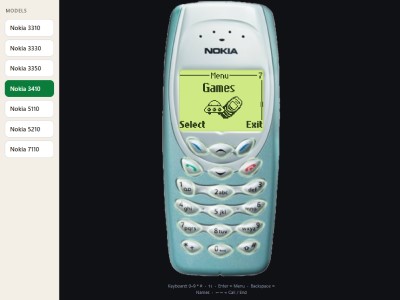
Nokia Emulator is a browser-based mobile phone simulator that recreates the experience of using several classic Nokia devices, including the Nokia 3310, 3410, 3350, 3330, 5110, 5210, and 7110 📱. Open the virtual phone, explore its familiar menus, press the old-style keypad buttons, and enjoy legendary built-in games such as Snake and Space Impact.
The emulator runs directly in a web browser, making it easy to revisit the look and feel of early Nokia phones without installing additional software. It is designed for retro technology fans, nostalgic players, and anyone curious about how mobile phones worked before modern touchscreen smartphones.
Use the Nokia Emulator Online
Nokia Emulator recreates the interface and controls of iconic Nokia mobile phones from the late 1990s and early 2000s. The virtual device includes a monochrome-style display, physical number keys, navigation buttons, menus, and recognizable phone functions inspired by the original hardware.
Select a supported model and interact with it much like a real classic Nokia phone. Navigate through menus, open applications, adjust settings, and launch retro mobile games directly from the simulated handset.
You can use Nokia Emulator online on PlayMiniGames without needing to find an original device, battery, charger, or physical cartridge.
Supported Nokia Phone Models
The browser emulator includes several famous Nokia models, each remembered for its durable design, simple interface, and long battery life.
- Nokia 3310
- Nokia 3410
- Nokia 3350
- Nokia 3330
- Nokia 5110
- Nokia 5210
- Nokia 7110
Nokia 3310 Emulator
The Nokia 3310 is one of the most recognizable mobile phones ever produced. Its compact design, replaceable covers, physical keypad, and built-in games made it a favorite among millions of users.
The emulator lets you experience the familiar menu layout and play classic Nokia 3310-style games without owning the original handset.
Nokia 3410 and 3330 Emulator
The Nokia 3410 and Nokia 3330 continued the simple and durable design associated with early Nokia phones. These models introduced their own menu variations and software features while preserving the familiar keypad-based experience.
Nokia 5110 and 5210 Emulator
The Nokia 5110 is remembered for its distinctive shape and customizable front covers. The Nokia 5210 offered a more rugged design intended for active users.
Both models represent an era when mobile phones focused on calls, text messages, simple utilities, and compact games.
Nokia 7110 Emulator
The Nokia 7110 featured a different design and interface compared with the 3310 family. Its sliding cover and navigation control made it one of the more distinctive Nokia phones of its generation.
How to Use Nokia Emulator
Using the emulator is similar to operating a physical Nokia phone. Click the virtual keypad and navigation buttons to move through menus and choose different functions.
Navigate the Phone Menu
Use the arrow or navigation controls to move between menu items. Press the select button to open an option and the back or exit button to return to the previous screen.
The exact layout may change depending on the selected Nokia model.
Use the Virtual Keypad
Click the number buttons to enter values, choose menu shortcuts, or control supported games. The star, zero, and hash keys may also perform different actions depending on the current screen.
Switch Between Nokia Models
If the emulator provides model selection, choose a different phone to compare its interface, design, and available functions. Each supported handset offers a slightly different retro mobile experience.
Play Snake in Nokia Emulator
Snake is one of the most famous classic mobile games. Control a growing snake, collect food, and avoid crashing into walls or your own tail 🐍.
The rules are simple, but the game becomes more difficult as the snake grows longer. Careful movement and planning are required to survive and achieve a high score.
How to Play Snake
Use the directional controls on the virtual Nokia keypad to move the snake around the screen. Collect the displayed items to increase your score and length.
Avoid turning directly into the snake’s body and leave enough open space for future movement.
Snake Strategy Tips
- Avoid trapping the snake in small corners.
- Plan turns before reaching the edge of the screen.
- Keep part of the board open for the longer snake.
- Do not make unnecessary rapid direction changes.
- Focus on survival before chasing a higher score.
Play Space Impact Online
Space Impact is a side-scrolling action game associated with classic Nokia phones. Control a spacecraft, avoid enemy attacks, and shoot hostile objects while moving through space-themed levels 🚀.
Compared with Snake, Space Impact offers faster gameplay with enemies, projectiles, obstacles, and combat encounters.
How to Play Space Impact
Use the virtual phone controls to move the spacecraft and fire at incoming enemies. Watch the monochrome display carefully because hazards may approach from several directions.
Preserve your health, avoid collisions, and defeat enemies before they fill the screen.
Space Impact Tips
- Keep moving when enemies begin firing.
- Avoid staying near the edge of the screen.
- Shoot early when multiple enemies appear.
- Watch for hazards hidden among projectiles.
- Learn the enemy patterns after each attempt.
A Retro Mobile Phone Experience
Nokia Emulator is more than a collection of old games. It recreates the feeling of navigating a phone with physical buttons, small menus, simple graphics, and limited applications.
For players who used Nokia phones in the past, the interface may bring back memories of writing text messages, changing ringtones, checking settings, and passing time with built-in games.
For younger users, the emulator offers a look at mobile technology before app stores, large touchscreens, social media applications, and modern operating systems.
Classic Monochrome Display
The simulated screen uses a simple monochrome visual style inspired by early Nokia LCD displays. This limited presentation helped the original devices remain easy to read while using very little power.
Physical Button Controls
Instead of swiping or tapping large icons, classic Nokia phones relied on number keys and small navigation buttons. The emulator preserves this interaction through clickable on-screen controls.
Simple Menus and Applications
The menu structure is intentionally compact. Phone functions, settings, tools, and games are organized into clear categories that can be opened with only a few button presses.
Why Players May Enjoy Nokia Emulator
Nokia Emulator appeals to both retro gaming fans and technology enthusiasts. It combines nostalgia, simple controls, classic phone interfaces, and two of the best-known early mobile games.
Players searching for a Nokia 3310 emulator, Nokia phone simulator, Snake online, Space Impact online, retro mobile games, old Nokia games, or browser phone emulators may enjoy exploring the supported models.
Nokia Emulator Features
- Browser-based Nokia phone simulation
- Support for several classic Nokia models
- Virtual physical keypad controls
- Retro monochrome-style interface
- Classic menu navigation
- Playable Snake game
- Playable Space Impact game
- No physical Nokia phone required
- Suitable for retro gaming and technology fans
- Playable directly in a web browser
Nokia Emulator Controls
- Mouse or Touchscreen — Press virtual phone buttons
- Navigation Buttons — Move through menus or control supported games
- Select Button — Open a highlighted menu item
- Back or Exit Button — Return to the previous screen
- Number Keys — Enter values or perform game actions
FAQ About Nokia Emulator
What is Nokia Emulator?
Nokia Emulator is a browser-based simulator that recreates the interface and controls of several classic Nokia mobile phones.
Which Nokia phones are supported?
The supported models include the Nokia 3310, 3410, 3350, 3330, 5110, 5210, and 7110.
Can I play Snake in Nokia Emulator?
Yes. The emulator includes a playable version of the classic Snake game.
Can I play Space Impact online?
Yes. Space Impact can be played through the virtual Nokia phone interface.
Do I need to download Nokia Emulator?
No. The emulator runs directly in a supported web browser without requiring installation.
Is Nokia Emulator an official Nokia product?
No. It is a fan-created browser emulator designed to reproduce the experience of classic Nokia phones.
Can I use Nokia Emulator on mobile devices?
The emulator may work on supported phones and tablets through touchscreen controls, although the experience can depend on the browser and device.