 Language
 Español
 Português
 Français
 Deutsche
 हिन्दी
 Nederland
 Русский
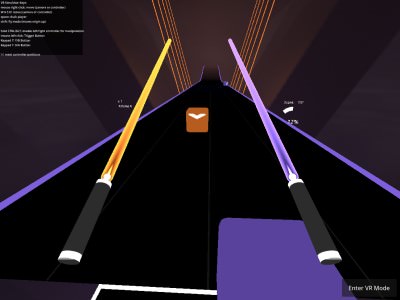
Open Saber
Rating: 4.14 from 5 (based on 14 votes. 👍 11 – users like it, 👎 3 – disliked, 💬 0 – comments posted)
Released: August 2026
Open Saber is an open-source virtual reality rhythm game designed for players who want fast saber-based music challenges on OpenXR and WebXR devices. It is a fork of Beep Saber by NeoSpark314, ported to Godot 4.3 with performance improvements, quality-of-life changes, and broader compatibility across supported VR platforms.
The game requires a VR headset and motion controllers to be played properly. Players slash rhythm targets in time with music, load compatible community-made levels, and can download new songs directly through the built-in BeatSaver interface 🎵⚔️.
Play Open Saber online on PlayMiniGames through a compatible WebXR setup, or use a native PC or Meta Quest version for better performance.
Play Open Saber Online in VR
Open Saber is not a traditional keyboard-and-mouse browser game. It is built specifically for virtual reality and requires a supported VR headset together with tracked controllers.
The browser edition uses WebXR, allowing compatible devices and browsers to launch the game without a standard desktop installation. However, the developer warns that the WebXR version performs considerably worse than the native PC and Quest releases.
The game may also run slowly during its first frames after launch. Performance should improve after the initial loading period, although results depend on the headset, browser, graphics hardware, and WebXR implementation.
What Is Open Saber?
Open Saber is a community-driven VR rhythm game where players use virtual sabers to interact with music-based levels. Its design is inspired by the familiar format of hitting directional rhythm blocks while following the beat of a song.
The project is based on Beep Saber and has been updated to use Godot 4.3 and OpenXR. This port aims to improve performance, modernize the technical foundation, and make the game compatible with more VR systems.
Because it supports OpenXR and WebXR, the project is intended to work across a wider range of headsets and platforms instead of being limited to one proprietary ecosystem.
VR Requirements
Open Saber requires dedicated virtual reality hardware. A regular monitor, mouse, keyboard, or touchscreen is not enough for the intended experience.
- A compatible VR headset
- Tracked VR motion controllers
- OpenXR support for native versions
- WebXR-compatible browser and headset for the browser version
- Enough performance for real-time VR rendering
The exact setup process may differ between PC VR, standalone Quest hardware, and browser-based WebXR devices.
WebXR Performance
The WebXR build makes Open Saber accessible directly through a supported browser, but it comes with important limitations.
According to the developer, WebXR performance is significantly worse than the PC and Quest versions. Players may notice lower frame rates, slower loading, or reduced responsiveness compared with native builds.
VR rhythm games depend heavily on stable performance and precise motion tracking. Even small delays can make it harder to hit targets accurately, so native versions may provide a better experience on supported hardware.
The first few frames after launching may be especially slow. This initial slowdown is expected, and the game may become smoother after loading finishes.
Built with Godot 4.3 and OpenXR
Open Saber was ported to Godot 4.3, a modern open-source game engine. The port also uses OpenXR, an open standard designed to simplify support for different virtual reality and augmented reality devices.
This technical combination helps reduce dependence on platform-specific VR systems. Developers and players can potentially use the same project across several compatible headsets.
The port also includes multiple quality-of-life and performance improvements over the original Beep Saber foundation.
Included Song
Open Saber includes “Time Lapse” by TheFatRat as a playable music track.
This gives players an immediate level to try after launching the game, without needing to download extra content first.
The song’s energetic electronic style fits the fast movement and timing-focused gameplay of a VR saber rhythm game.
Download Custom Levels from BeatSaver
One of Open Saber’s most important features is its built-in BeatSaver integration. Players can use the in-game interface to browse and download additional levels directly.
This makes it possible to expand the song collection without manually moving every map into the game folders.
Community Map Compatibility
Most BeatSaver maps are described as compatible with Open Saber. This gives players access to a large selection of community-created rhythm levels.
However, maps that require special mods may not function as intended. Some may contain unsupported effects, mechanics, or custom features.
Players can still try those maps, but results may vary. A level may load incorrectly, lose some effects, or fail to run completely.
How to Play Open Saber
Launch the game using a supported VR headset and make sure both motion controllers are tracked correctly.
Choose an included or downloaded music level, then use the virtual sabers to hit the rhythm targets as they approach. Follow the timing and direction shown by the level.
Good performance depends on staying synchronized with the music, moving the correct saber, and reacting quickly to incoming patterns.
Because the supplied description does not list exact button mappings, players should follow the in-game prompts for menu navigation, level selection, and interaction.
Native PC and Meta Quest Versions
Open Saber is available in several forms, including browser-based WebXR, native PC VR, and Meta Quest.
PC VR Version
The PC build is intended for compatible OpenXR headsets connected to a computer. It should generally provide better performance than the browser edition when used with suitable hardware.
Meta Quest Version
A Meta Quest version is available through SideQuest. This offers another way to install and play Open Saber directly on compatible Quest devices.
The Quest edition may be preferable for players who want a native standalone experience without relying on WebXR.
Open-Source Project
Open Saber’s source code is publicly available through GitHub (https://github.com/leandrodreamer/BeepSaber/tree/godot-4-port). The project is based on the Godot 4 port branch of Beep Saber.
Open-source availability allows developers to inspect the code, study how the VR rhythm mechanics work, contribute improvements, or create their own modifications.
This also makes Open Saber interesting beyond ordinary gameplay. It can serve as a learning project for developers interested in Godot VR, OpenXR, WebXR, rhythm game design, and community map support.
Why Players May Enjoy Open Saber
Open Saber is suitable for players who enjoy VR rhythm games, saber music games, open-source projects, custom song maps, and community-created content.
Its main advantage is flexibility. Players can use the included track, download additional levels through BeatSaver, and run the game across compatible OpenXR or WebXR systems.
The project may also appeal to players looking for an open-source alternative in the VR rhythm genre. Its Godot 4.3 foundation and public source code make it useful for both players and developers.
Players searching for Open Saber online, Beep Saber Godot 4, open-source VR rhythm games, WebXR saber games, BeatSaver-compatible games, or Meta Quest rhythm games may find this project especially relevant.
Open Saber Features
- Virtual reality rhythm gameplay
- Requires a VR headset and motion controllers
- Based on Beep Saber
- Ported to Godot 4.3
- OpenXR support
- WebXR browser version
- Native PC VR version
- Meta Quest version through SideQuest
- Built-in BeatSaver level downloader
- Support for many community maps
- Included “Time Lapse” track by TheFatRat
- Quality-of-life improvements
- Performance improvements over the original project
- Publicly available source code
Important Notes
Open Saber cannot be played properly without VR hardware. Desktop and mobile users without a compatible headset will not receive the intended gameplay experience.
The WebXR version may perform worse than the native PC and Quest editions. Players sensitive to low frame rates or motion discomfort should use the most stable version available for their headset.
Community maps that rely on unsupported mods may not work correctly, even if standard BeatSaver levels are generally compatible.
FAQ About Open Saber
What type of game is Open Saber?
Open Saber is an open-source virtual reality rhythm game where players use motion-controlled sabers to play music levels.
Does Open Saber require a VR headset?
Yes. A compatible VR headset and motion controllers are required for proper gameplay.
Can Open Saber run in a browser?
Yes. A WebXR version is available for compatible browsers and VR headsets.
Why does the WebXR version run slowly?
The developer states that the WebXR build performs considerably worse than the native PC and Quest versions. It may also run slowly during the first frames after launch.
Can I download custom songs?
Yes. Open Saber includes an in-game interface for downloading compatible levels from BeatSaver.
Do all BeatSaver maps work?
Most maps are expected to work, but levels that require specific mods may not run correctly.
Which song is included with the game?
The game includes “Time Lapse” by TheFatRat.
Is Open Saber available on Meta Quest?
Yes. A Meta Quest version is available through SideQuest.
Is the source code available?
Yes. The Godot 4 port source code is publicly available on GitHub (https://github.com/leandrodreamer/BeepSaber/tree/godot-4-port).